<?xml version="1.0" encoding="utf-8"?><feed xmlns="http://www.w3.org/2005/Atom" ><generator uri="https://jekyllrb.com/" version="3.10.0">Jekyll</generator><link href="https://infinitylogesh.github.io/feed.xml" rel="self" type="application/atom+xml" /><link href="https://infinitylogesh.github.io/" rel="alternate" type="text/html" /><updated>2026-03-07T16:14:35+00:00</updated><id>https://infinitylogesh.github.io/feed.xml</id><title type="html">Logesh Kumar Umapathi</title><subtitle>Welcome to my little place on the internet! Here I document my thoughts on Machine learning and NLP.</subtitle><entry><title type="html">Introducing Vaan: Bringing the power of multimodal LLMs to the real world live video streams</title><link href="https://infinitylogesh.github.io/blog/2026/03/06/introducing-vaan.html" rel="alternate" type="text/html" title="Introducing Vaan: Bringing the power of multimodal LLMs to the real world live video streams" /><published>2026-03-06T00:00:00+00:00</published><updated>2026-03-06T00:00:00+00:00</updated><id>https://infinitylogesh.github.io/blog/2026/03/06/introducing-vaan</id><content type="html" xml:base="https://infinitylogesh.github.io/blog/2026/03/06/introducing-vaan.html"><![CDATA[<video src="https://pub-3d45716910b34ddaac4aced54197b940.r2.dev/videos/elderly_falling_edited_v1.mp4" autoplay="" loop="" muted="" playsinline="" controls="" preload="metadata" class="hero-demo-video"></video>
<figcaption style="text-align: center;">Vaan alerts when a person / elderly falls down. Query: "Alert me if you see people falling down"</figcaption>

<div class="hero-links">
  <a href="#demo">Demo</a>
  <a href="https://github.com/ambient-intelligence-hq/vaan" class="hero-links__external">GitHub</a>
  <a href="https://discord.gg/fdeCaGy5T4" class="hero-links__external">Discord</a>
  <a href="https://github.com/ambient-intelligence-hq/vaan?tab=readme-ov-file#getting-started" class="hero-links__external">Getting Started</a>
</div>

<p><br /></p>

<p><br /></p>

<p>Cameras are everywhere — in our homes, on our streets, in stores, at intersections, in care centers, in mobile devices and across the systems we rely on every day. Yet most of them are still just passive recordings: endless hours of footage that no one watches unless something has already gone wrong.</p>

<p>What if live video systems could do more than just record? What if they could understand context, reason over events, and alert only when something genuinely important happens? — even across thousands of hours of uneventful footage? Better yet, what if they could anticipate important events before they fully unfold?</p>

<p>A system like that could make streets safer, help elders live more independently, give parents greater peace of mind, and make homes more secure.</p>

<p>Vaan is a step in that direction. Its goal is to be a flexible, promptable system for monitoring live video streams and alerting users when important events of interests happen.</p>

<h1 id="how-it-works">How it works</h1>

<h2 id="problem">Problem</h2>

<p>The core problem in live video understanding is sparsity. In most real-world streams, the events we care about are rare.</p>

<p>A fall, an accident, a theft, an abandoned item, or an unusual event may happen only once in thousands of hours of footage. In many streams, it may never happen at all. And yet the system has to stay ready, keep watching, and make the right call in real time. This makes the problem fundamentally different from the typical short-context perception tasks that multimodal LLMs have shown strong capabilities for.</p>

<p>Because of this, we cannot process the entire stream with multimodal LLMs in the traditional way (limitations: context windows , latency and the cost ). At the same time, we still want to leverage the world understanding and reasoning capabilities of multimodal LLMs and to have the flexibility of handling variety of events <b>just with text based queries</b> and not complex configuration or event specific pipelines.</p>

<h2 id="approach">Approach</h2>

<h4 id="inspiration">Inspiration</h4>

<p>If we squint a little, this problem looks very similar to the one faced by live voice assistants. Live voice assistants deal with a comparable challenge, though usually in a less extreme form. Where the signal of interest — user speech — is also sparse relative to the total duration of the stream.They must continuously determine when the user is speaking and when she is not.</p>

<p>This is why modern voice assistants built on top of general-purpose LLMs do not hand off transcript / raw audio continuously to the model. Instead, they use a staged pipeline that cheaply filters, segments, and validates candidate moments before escalating to a more capable and more expensive model.</p>

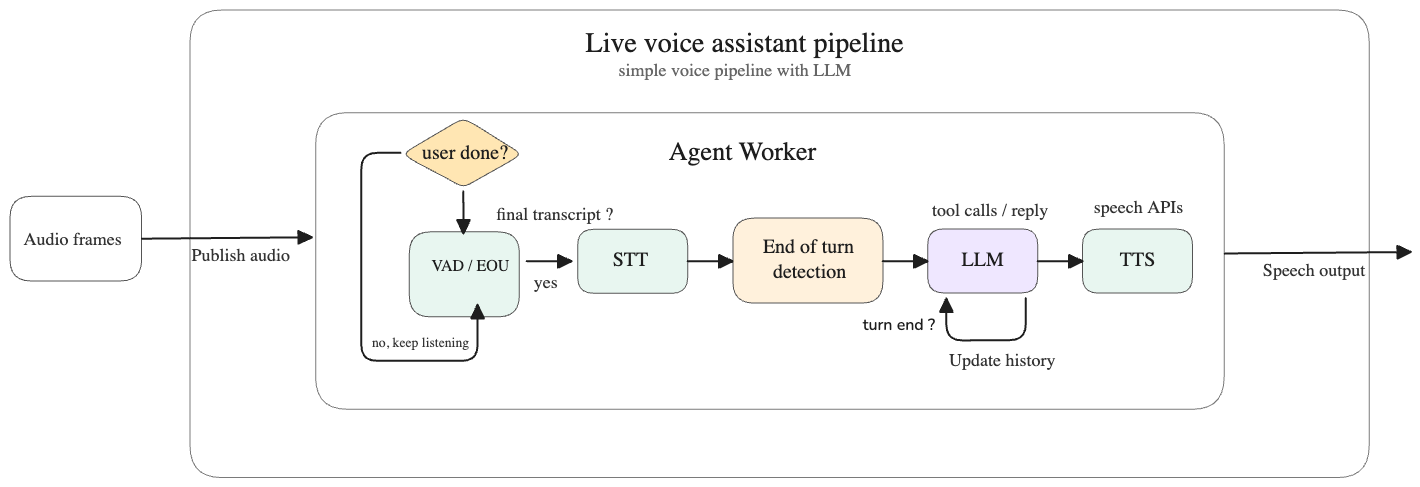
<p>Modern live voice assistant systems such as <a href="https://github.com/livekit/agents">LiveKit Agents</a> address this using a pipeline like the one shown below:</p>

<p><img src="/assets/images/voice-assistant-flow-2.png" alt="Voice assistant architecture" width="900" class="zoomable-image" /></p>

<p>The key stages in that pipeline are:</p>

<ul>
  <li>The audio stream is chunked and passed through a VAD (voice activity detection) model to determine whether the user is speaking, whether speech is ongoing, and whether the user has paused or finished speaking.</li>
  <li>Once a pause or end of speech is detected, the chunk is sent to a transcription model to generate text.</li>
  <li>A pause detected by VAD does not necessarily mean the user has completed their thought. For example: <em>“I want to switch on the lights … (pause) in the dining room.”</em> To avoid handing incomplete input to the LLM, an end-of-turn detection model is used to determine whether the transcript actually represents a complete user turn.</li>
  <li>Once the transcript is classified as complete and end-of-turn, it is passed to the LLM to generate a response.</li>
  <li>The response is then sent to a TTS (text-to-speech) model to produce audio output.</li>
</ul>

<p>All of these steps are executed in a streaming manner to reduce both latency and context usage.</p>

<p>At a high level, the solution is to first use a cheap and fast mechanism to speculate whether an event of interest has occurred — in the voice assistant case, speech and turn detection — and then hand over only the relevant context to a more accurate but more expensive LLM for verification and response generation.</p>

<p>This is similar to what Vaan attempts to achieve for live video streams.</p>

<h4 id="solution">Solution</h4>

<p>Vaan uses a relatively cheap and fast mechanism to speculate whether an event of interest may have occurred — using rerankers or embedding-based retrievers — and then accumulates the relevant context before passing it to a more accurate but more expensive LLM to verify the event and generate the required response.</p>

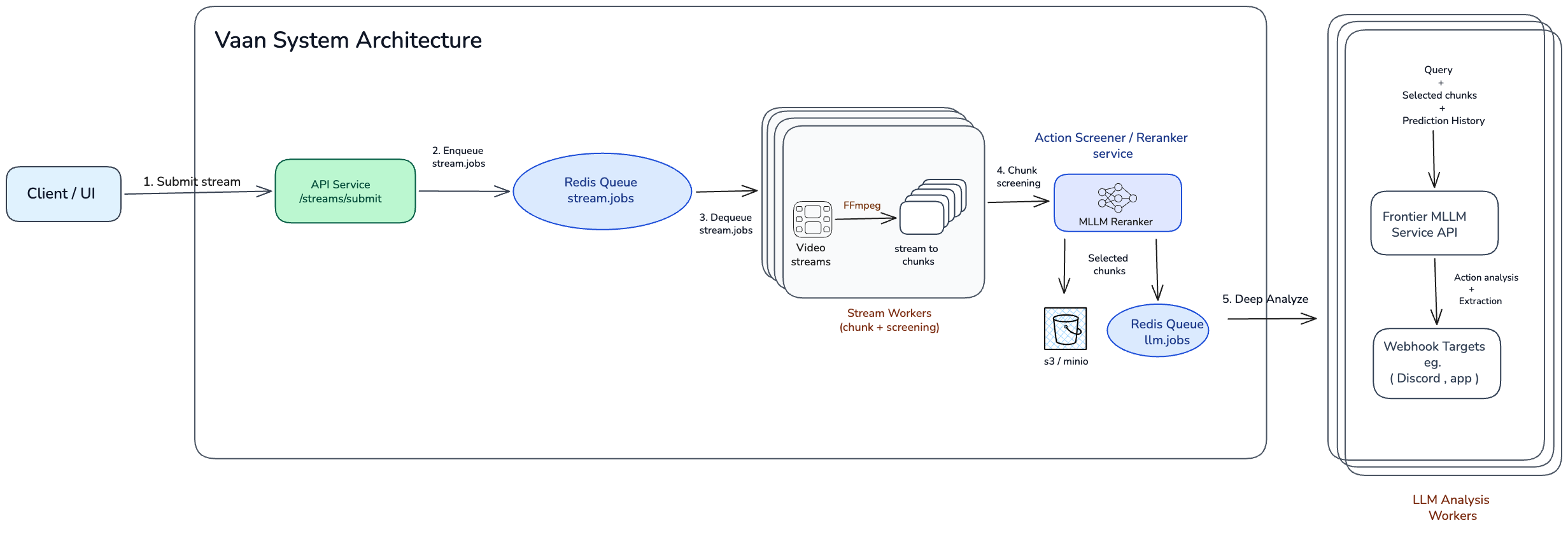
<p>Here is a high-level overview of the architecture:</p>

<p><img src="/assets/images/system_architecture_3.png" alt="Voice assistant architecture" style="width: 100%;" class="zoomable-image" /></p>

<p>The key stages in this pipeline are:</p>

<ul>
  <li>Once a stream is submitted, it is picked up by a stream worker for processing.</li>
  <li>The stream worker continuously chunks the video stream and passes each chunk to a screener (reranker) model to determine whether it is relevant to the trigger queries.</li>
  <li>If a chunk is identified as relevant, it is passed — along with neighboring chunks and other relevant context — to an LLM worker.</li>
  <li>The LLM worker reasons over the context, verifies the event and generates , extracting the required information for the alert.</li>
</ul>

<div id="demo"></div>
<h1 id="demo">Demo</h1>

<p>We’ve put together a few demos of Vaan in action across very different real-world scenarios on a demo UI ( scroll horizontally over the videos to see them all ):</p>

<ul>
  <li>Alerting when a baby has fallen down or may have gotten hurt.</li>
  <li>Alerting when uninvited wildlife shows up to raid the cat food.</li>
  <li>Alerting when Santa places a gift. (yes — Santa can’t sneak past this one 😅)</li>
  <li>Alerting when a vehicle accident occurs at an intersection.</li>
  <li>Alerting when a customer completes a checkout and walks away leaving their items behind.</li>
  <li>Alerting when a person / elderly falls down.</li>
</ul>

<p><br /></p>

<div class="demo-carousel" data-carousel="" style="--demo-slide-width: 45rem; --demo-video-aspect: 16 / 9;">
  <div class="demo-carousel__viewport" data-carousel-track="">
    <figure class="demo-carousel__slide">
      <video src="https://pub-3d45716910b34ddaac4aced54197b940.r2.dev/videos/baby_falling_demo_edited.mp4" autoplay="" loop="" muted="" playsinline="" controls="" preload="metadata"></video>
      <figcaption>Vaan alerts when a baby has fallen down or may have gotten hurt.<br /> Query: "baby getting hurt or falling down"</figcaption>
    </figure>

    <figure class="demo-carousel__slide">
      <video src="https://pub-3d45716910b34ddaac4aced54197b940.r2.dev/videos/fox_cat_demo_v3.mp4" autoplay="" loop="" muted="" playsinline="" controls="" preload="metadata"></video>
      <figcaption>Vaan alerts when uninvited wildlife shows up to raid the cat food.<br /> Query: "when the wildlife eats the cat foold. tell me only when it starts eating"</figcaption>
    </figure>

    <figure class="demo-carousel__slide">
      <video src="https://pub-3d45716910b34ddaac4aced54197b940.r2.dev/videos/santa_places_gift_edited_v1.mp4" autoplay="" loop="" muted="" playsinline="" controls="" preload="metadata"></video>
      <figcaption>Vaan alerts when Santa places a gift.<br /> Query: "Alert me when santa places the gift in the christmas tree"</figcaption>
    </figure>

    <figure class="demo-carousel__slide">
      <video src="https://pub-3d45716910b34ddaac4aced54197b940.r2.dev/videos/seattle_car_accident_demo.mp4" autoplay="" loop="" muted="" playsinline="" controls="" preload="metadata"></video>
      <figcaption>Vaan alerts when a vehicle accident occurs at an intersection.<br /> Query: "alert me when an accident involving vehicles happen"</figcaption>
    </figure>

    <figure class="demo-carousel__slide">
      <video src="https://pub-3d45716910b34ddaac4aced54197b940.r2.dev/videos/shopping_missing_detection_edited.mp4" autoplay="" loop="" muted="" playsinline="" controls="" preload="metadata"></video>
      <figcaption>Vaan alerts when a customer completes a checkout and walks away leaving their items behind.<br /> Query: "a customer completes a checkout and walks away leaving their items behind"</figcaption>
    </figure>

    <figure class="demo-carousel__slide">
      <video src="https://pub-3d45716910b34ddaac4aced54197b940.r2.dev/videos/elderly_falling_edited_v1.mp4" autoplay="" loop="" muted="" playsinline="" controls="" preload="metadata"></video>
      <figcaption>Vaan alerts when a person falls down.<br /> Query: "Alert me if you see people falling down"</figcaption>
    </figure>
  </div>

  <div class="demo-carousel__controls">
    <button type="button" class="demo-carousel__button demo-carousel__button--muted" data-carousel-prev="" data-carousel-direction="prev" aria-label="Show previous demo"></button>
    <button type="button" class="demo-carousel__button demo-carousel__button--primary" data-carousel-next="" data-carousel-direction="next" aria-label="Show next demo"></button>
  </div>
</div>

<div class="image-lightbox" data-image-lightbox="" hidden="">
  <button type="button" class="image-lightbox__close" data-image-lightbox-close="" aria-label="Close image zoom"></button>
  <img src="" alt="" class="image-lightbox__image" data-image-lightbox-image="" />
</div>

<script>
  (function () {
    var carousels = document.querySelectorAll('[data-carousel]');

    carousels.forEach(function (carousel) {
      var track = carousel.querySelector('[data-carousel-track]');
      var prev = carousel.querySelector('[data-carousel-prev]');
      var next = carousel.querySelector('[data-carousel-next]');
      if (!track || !prev || !next) return;

      var scrollBySlide = function (direction) {
        var slide = track.querySelector('.demo-carousel__slide');
        var gap = parseFloat(window.getComputedStyle(track).columnGap || window.getComputedStyle(track).gap || 0);
        var amount = slide ? slide.getBoundingClientRect().width + gap : track.clientWidth;
        track.scrollBy({ left: direction * amount, behavior: 'smooth' });
      };

      prev.addEventListener('click', function () { scrollBySlide(-1); });
      next.addEventListener('click', function () { scrollBySlide(1); });
    });

    var lightbox = document.querySelector('[data-image-lightbox]');
    var lightboxImage = document.querySelector('[data-image-lightbox-image]');
    var lightboxClose = document.querySelector('[data-image-lightbox-close]');
    var zoomableImages = document.querySelectorAll('.zoomable-image');

    if (lightbox && lightboxImage && lightboxClose && zoomableImages.length) {
      var closeLightbox = function () {
        lightbox.hidden = true;
        document.body.classList.remove('image-lightbox-open');
        lightboxImage.src = '';
        lightboxImage.alt = '';
      };

      zoomableImages.forEach(function (image) {
        image.addEventListener('click', function () {
          lightboxImage.src = image.currentSrc || image.src;
          lightboxImage.alt = image.alt || '';
          lightbox.hidden = false;
          document.body.classList.add('image-lightbox-open');
        });
      });

      lightboxClose.addEventListener('click', closeLightbox);
      lightbox.addEventListener('click', function (event) {
        if (event.target === lightbox) closeLightbox();
      });
      document.addEventListener('keydown', function (event) {
        if (event.key === 'Escape' && !lightbox.hidden) closeLightbox();
      });
    }
  })();
</script>

<p><br /></p>

<p><br /></p>

<div id="getting-started"></div>
<h1 id="getting-started">Getting started</h1>

<p>Follow the instructions in the <a href="https://github.com/ambient-intelligence-hq/vaan?tab=readme-ov-file#getting-started">README</a> to setup and get started.</p>

<div id="current-limitations"></div>
<h1 id="current-limitations">Current limitations</h1>

<ul>
  <li>
    <p>The screener model uses <code class="language-plaintext highlighter-rouge">Qwen3-VL-Reranker-2B</code> to perform fast verification of chunks against the trigger queries. Out of the box, the model shows poor separability of classes: negative examples typically score below 53%, while positive examples are often only slightly higher, in the 55–57% range. This leaves little margin for reliable thresholding.</p>
  </li>
  <li>
    <p>We found that a threshold of 0.55 provides a good balance between precision and recall. However, the optimal threshold depends on the use case, so it may need to be adjusted based on your requirements. We recommend starting with 0.55 and calibrating it on your own data.</p>
  </li>
  <li>
    <p>Current frontier multimodal LLMs are reasonably good at understanding videos and detecting actions, but they still do not perform as well on video reasoning tasks as they do on text reasoning tasks. To illustrate this, here are two examples of false positives.</p>

    <ol>
      <li>
        <p>In the first example, the model misinterprets overhead power lines on the street as fallen lines. It then combines this perception error with the presence of a police or emergency vehicle in the corner of the frame — likely from the aftermath of a different incident — and incorrectly classifies the scene as a car accident. The camera angle makes the power lines appear as though they are lying on the road, but for a human observer it is fairly obvious that this is not an accident scene.</p>
      </li>
      <li>
        <p>In the second example, the trigger query is: “a customer completes a checkout and walks away leaving their items behind.” Here, the model fails to distinguish between empty shopping bags placed at the end of the checkout aisle and the customer’s actual items. As a result, it incorrectly concludes that the customer has walked away and left their items behind.</p>
      </li>
    </ol>
  </li>
</ul>

<p>This behavior is not specific to any one model. We observe similar failure modes across current frontier multimodal LLMs with native video support, including <code class="language-plaintext highlighter-rouge">gemini-3.1-pro-preview</code>, <code class="language-plaintext highlighter-rouge">gemini-3-flash-preview</code>, <code class="language-plaintext highlighter-rouge">qwen3.5-plus-02-15</code>, and <code class="language-plaintext highlighter-rouge">glm-4.6v</code>.</p>

<p><br /></p>

<p><br /></p>

<div class="demo-carousel" data-carousel="" style="--demo-slide-width: 50rem; --demo-video-aspect: 16 / 9;">
  <div class="demo-carousel__viewport" data-carousel-track="">
    <figure class="demo-carousel__slide">
      <video src="https://pub-3d45716910b34ddaac4aced54197b940.r2.dev/videos/false_positive_car_accident_edited.mp4" autoplay="" loop="" muted="" playsinline="" controls="" preload="metadata"></video>
      <figcaption>Limitation Example 1: The model mistakes overhead street power lines for fallen lines and incorrectly flags the scene as a car accident.</figcaption>
    </figure>

    <figure class="demo-carousel__slide">
      <video src="https://pub-3d45716910b34ddaac4aced54197b940.r2.dev/videos/shopping_error_edited.mp4" autoplay="" loop="" muted="" playsinline="" controls="" preload="metadata"></video>
      <figcaption>Limitation Example 2: Query: "a customer completes a checkout and walks away leaving their items behind".<br /> The model mistakes empty bags near the checkout aisle for abandoned items and incorrectly flags the customer as leaving without them.
</figcaption>
    </figure>
  </div>

  <div class="demo-carousel__controls">
    <button type="button" class="demo-carousel__button demo-carousel__button--muted" data-carousel-prev="" data-carousel-direction="prev" aria-label="Show previous demo"></button>
    <button type="button" class="demo-carousel__button demo-carousel__button--primary" data-carousel-next="" data-carousel-direction="next" aria-label="Show next demo"></button>
  </div>
</div>

<div class="image-lightbox" data-image-lightbox="" hidden="">
  <button type="button" class="image-lightbox__close" data-image-lightbox-close="" aria-label="Close image zoom"></button>
  <img src="" alt="" class="image-lightbox__image" data-image-lightbox-image="" />
</div>
<p><br /></p>

<p><br /></p>
<h1 id="future-directions">Future directions</h1>

<p>The current limitations outlined above are exactly what make this such an interesting and valuable problem to solve.</p>

<p>Some of the most exciting future directions are:</p>

<ul>
  <li>Improve the screener model to achieve better separation between positive and negative examples, while making it more robust to variations in query phrasing, camera angle, and real-world noise.</li>
  <li>Move the screener closer to the source. Today, the screener is designed to run on serverless infrastructure on Modal, but over time we want it to run nearer to the camera — and eventually on-device where possible.</li>
  <li>Build systems that are more robust to the messiness of the real world. Real-world environments are noisy, ambiguous, and highly variable, and we want both the screening pipeline and the LLM layer to handle these variations more reliably.</li>
  <li>Create / curate a benchmark relevant to this problem to reliably evaluate the performance of the systems and future LLMs.</li>
  <li>System that can anticipate / predict events before they happen.</li>
</ul>

<h2 id="contributing">Contributing</h2>

<p>We understand that this is a highly sensitive problem, which is exactly why we believe in building it in public.If any of these directions are interesting to you, please feel free to contribute to the project or share your thoughts and feedback in github issues or join the discord channel <a href="https://discord.gg/fdeCaGy5T4">here</a>. You can find the code and documentation in the <a href="https://github.com/ambient-intelligence-hq/vaan">GitHub repository</a>.</p>

<div class="hero-links">
  <a href="https://github.com/ambient-intelligence-hq/vaan" class="hero-links__external">GitHub</a>
  <a href="https://discord.gg/fdeCaGy5T4" class="hero-links__external">Discord</a>
</div>]]></content><author><name></name></author><category term="blog" /><summary type="html"><![CDATA[Vaan alerts when a person / elderly falls down. Query: "Alert me if you see people falling down"]]></summary></entry><entry><title type="html">Selfletter: Why I Built a Newsletter for One (Me)</title><link href="https://infinitylogesh.github.io/blog/2025/12/28/selfletter.html" rel="alternate" type="text/html" title="Selfletter: Why I Built a Newsletter for One (Me)" /><published>2025-12-28T00:00:00+00:00</published><updated>2025-12-28T00:00:00+00:00</updated><id>https://infinitylogesh.github.io/blog/2025/12/28/selfletter</id><content type="html" xml:base="https://infinitylogesh.github.io/blog/2025/12/28/selfletter.html"><![CDATA[<blockquote>
  <p>TLDR: I struggle with keeping pace with the latest AI research. My latest attempt at tackling this is to have an automated newsletter sent to me with the summaries of interesting research resources that I added to my reading list the day before. <i>(Because apparently my coping mechanism is “add more automation,” not “read the papers.”)</i></p>

  <p>An example <a href="https://github.com/infinitylogesh/selfletter/blob/main/examples/daily-newsletter.md">newsletter</a>. I detail my process in this post.</p>

</blockquote>

<h3 id="the-problem">The problem</h3>

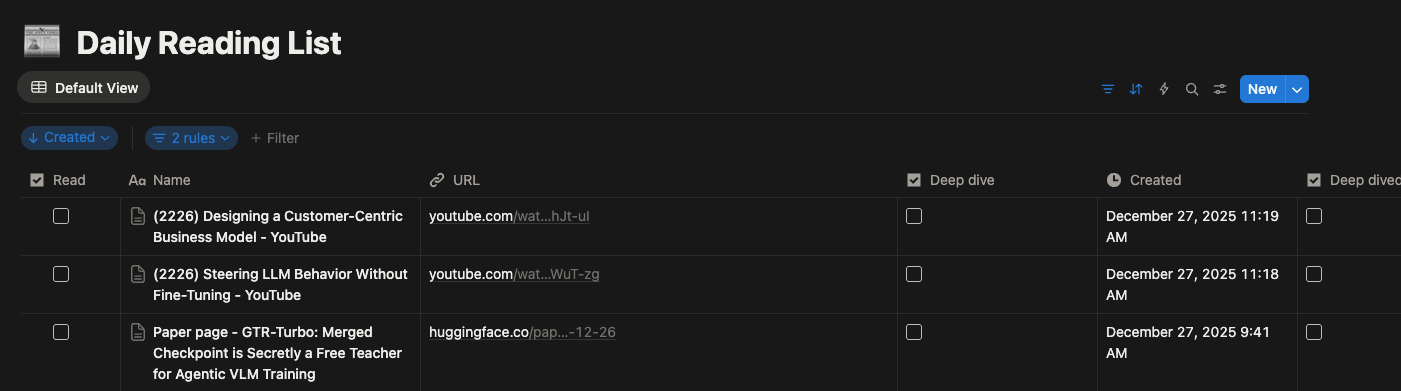
<p>I have been maintaining a reading list in a Notion database <i>(my first brain)</i> for a few years now . I clip/add any resources that I want to read to this list from my browser/phone. The goal is to have a quick way to collect resources without getting distracted by going too deeply into any particular one.</p>

<p>This system works well if I read through all the resources I added the day before on the next day. But as you have guessed by now, this doesn’t always happen, and now I am in a situation where the reading list has 2000 resources to read.</p>

<div style="text-align: center;">
<img src="/assets/images/my_reading_list.png" />
<p style="font-size: medium;"><em>Hi! from my reading list</em></p>
</div>

<p>I have two problems at hand <i>(that I want to acknowledge)</i>: one is clearing the big, gigantic list that brings me anxiety and stares at me every day, and the other is having a more efficient system to clear the things that are added from now on. This post is about the latter.
<i>(The former and I have agreed to make eye contact but not talk about it; the big, gigantic list can wait for now!)</i>.</p>

<h3 id="the-duct-taped-workflow">The Duct-Taped Workflow</h3>

<p>In my usual end of the year urge to make atleast the next year better, I have a new extension to the system. <i>(One more workflow duct-taped onto the same chaos)</i>.</p>

<p>I am experimenting with an automated single-person newsletter. The system takes the links I added to the list the day before, fetches the content from the resources, and summarises the content (see the prompt and format below) into a daily newsletter that gets sent to me in the morning.</p>

<p>I hope this will at least give me an overview of the list and help me cover its breadth. If something interests me further, I’ll sit down to read it properly / take a deep dive.</p>

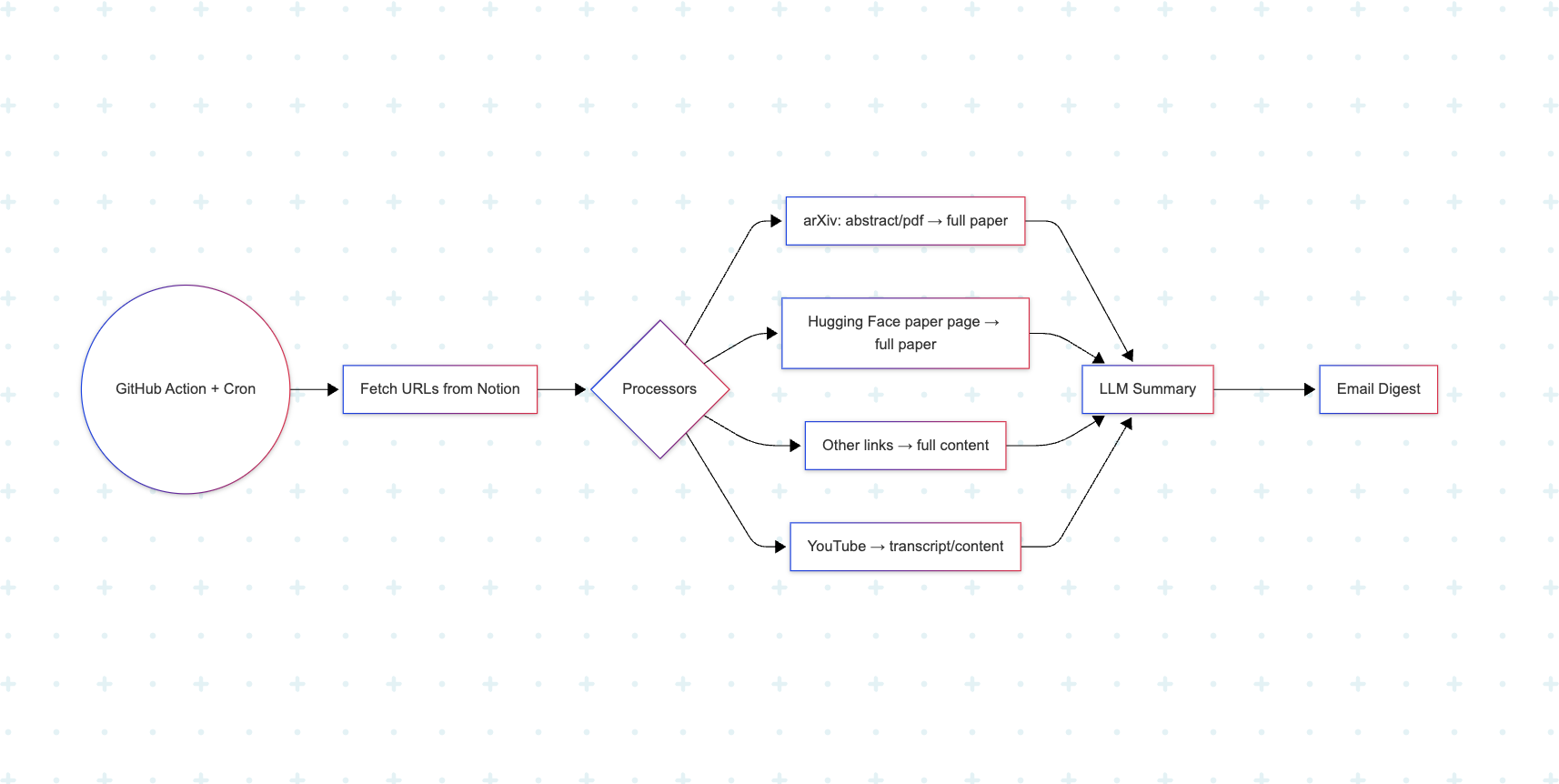
<p>I wanted to keep it simple without requiring any babysitting and also to be cheaper to run. Here is a breakdown of the system:</p>

<div style="text-align: center;">
<img src="/assets/images/flow_diagram.png" />
<p style="font-size: medium;"><em>simple sketch of the workflow</em></p>
</div>

<ul>
  <li>The system is a repository on GitHub - <a href="https://github.com/infinitylogesh/selfletter">Selfletter</a>.</li>
  <li>A GitHub Action is scheduled on the repo to run every morning to fetch the content from the lists I added the day before and send the newsletter to my email as a single digest after the summarisation and collation are done.</li>
  <li>It has an initial list of data processors to fetch content from:
    <ul>
      <li>arXiv URLs - abstracts, PDFs → full paper</li>
      <li>Hugging Face paper page -&gt; full paper</li>
      <li>Other resources → full content</li>
    </ul>
  </li>
  <li>I use the Reader API from <a href="http://jina.ai/">Jina.ai</a> (<a href="http://r.jina.ai/">r.jina.ai</a>, Thanks <a href="http://jina.ai/">Jina.ai</a>!) to fetch the content for all the resources listed above.</li>
  <li>Pass it to an LLM (gpt-oss-120b) to summarize, and I use SMTP and Gmail with <a href="https://support.google.com/accounts/answer/185833?hl=en">Google application passwords</a> to send the email to myself.</li>
</ul>

<h3 id="summary-prompt">Summary prompt</h3>

<p>I follow Andrew Ng’s great <a href="https://youtu.be/733m6qBH-jI?t=830">advice</a> on how and what to read from a paper. My summary prompt is based on that:</p>

<div class="language-bash highlighter-rouge"><div class="highlight"><pre class="highlight"><code>Summarize the following content:

Title: <span class="o">{</span>title<span class="o">}</span>
URL: <span class="o">{</span>url<span class="o">}</span>

CONTENT:
<span class="o">{</span>content<span class="o">}</span>

You should always create summaries capturing the below template as a markdown file <span class="o">(</span>with accurate markdown formatting and structure<span class="o">)</span>, It is important to follow the template exactly without leaving any section empty:

<span class="c">## What did the author accomplish ?</span>

 -  What

 -  Why

<span class="c">## What are the key elements of the approach ?</span>

 -  How
    - How the approach is implemented
    - Embed one important image / diagram / code snippet from the content showing the approach <span class="o">(</span>embed it <span class="k">in </span>size suitable <span class="k">for </span>email newsletter<span class="o">)</span>

<span class="c">## What can you use yourself?</span>
- important tools and resources from the content <span class="o">(</span> model links , dataset links , github links etc<span class="o">)</span>
- recipies / methodologies discussed <span class="k">in </span>the content
- hyperparameters / best practices discussed <span class="k">in </span>the content
- other useful aspects that can be integrated into further research.

<span class="c">## Training compute:</span>
- If the content discusses training compute - training hours , GPU used etc.

<span class="c">## References to further follow / read ?</span>
- important references and links from the content
</code></pre></div></div>

<h3 id="using-the-repo">Using the repo</h3>

<p>Feel free to try the repo and fork it to adapt to your needs.  Keep in mind that this was created to suit my workflow <i>( and my chaos)</i>, if you like to adapt to yours - you can do it by fitting your workflow <a href="https://github.com/infinitylogesh/selfletter/blob/cf572c66220a97e36267c6f9ee46da1f8893235f/src/selfletter/cli.py#L126">here</a></p>

<p>Repo: <a href="https://github.com/infinitylogesh/selfletter">Selfletter</a></p>

<h3 id="acknowledgement-and-gratitude">Acknowledgement and Gratitude:</h3>

<ul>
  <li>Thanks to <a href="http://jina.ai/">Jina.ai</a> for the free reader endpoint</li>
  <li>Thanks to Github Actions service for making this service simpler.</li>
  <li>Thanks to Andrew Ng’s <a href="https://youtu.be/733m6qBH-jI?t=830">advice</a>. The prompt is based on the advice.</li>
  <li>This repo was mostly vibe coded with <a href="https://docs.blackbox.ai/features/blackbox-cli/introduction">Blackbox Cli</a></li>
</ul>]]></content><author><name></name></author><category term="blog" /><summary type="html"><![CDATA[TLDR: I struggle with keeping pace with the latest AI research. My latest attempt at tackling this is to have an automated newsletter sent to me with the summaries of interesting research resources that I added to my reading list the day before. (Because apparently my coping mechanism is “add more automation,” not “read the papers.”) An example newsletter. I detail my process in this post.]]></summary></entry><entry><title type="html">Agent Interfaces: Bridging LLMs and Software Engineering</title><link href="https://infinitylogesh.github.io/blog/2024/08/03/agent-interfaces.html" rel="alternate" type="text/html" title="Agent Interfaces: Bridging LLMs and Software Engineering" /><published>2024-08-03T00:00:00+00:00</published><updated>2024-08-03T00:00:00+00:00</updated><id>https://infinitylogesh.github.io/blog/2024/08/03/agent-interfaces</id><content type="html" xml:base="https://infinitylogesh.github.io/blog/2024/08/03/agent-interfaces.html"><![CDATA[<p>It is well-established that LLMs are useful at coding. With the ongoing advancement in their code refinement abilities with execution feedback, and increasing context length, coupled with decreasing costs,it is becoming apparent that LLMs will play a significant role in software development and likey to surpass human contribution.</p>

<p>Having said that, software development is complex and involves many aspects that LLMs still struggle with, like effectively solving repository level tasks, collaboration,  using and integrating with our existing workflows and tooling.</p>

<p>Just as <a href="https://code.visualstudio.com/docs/editor/intellisense">syntax highlighting , code completions , tool tips with code hints , linting</a> in an IDE help improve coding efficiency for humans, interfaces purpose built for agents would help improve the coding success rate of LLMs.  These interfaces decide how a code context or an execution output context can be shared with LLMs effectively for their usage. These interfaces are a step towards bridging the gap in current abilities of LLMs in completing SWE tasks.</p>

<p>In this blog post, we will explore some of the latest agent interfaces that have been used in state-of-the-art software engineering (SWE) agents</p>

<p>These interfaces can be broadly split into two high-level categories:</p>

<ul>
  <li>Localization of the code to change ( Context retrieval )</li>
  <li>Patch generation ( Making the change required for a fix or new feature )</li>
</ul>

<h2 id="localization-of-the-code-to-change">Localization of the code to change:</h2>

<p>The first step in fixing or implementing a new feature to a repository is to understand the overall structure of the repository and locate the files and lines to be changed in the repository.  Giving the context of a full repo is inefficient and impractical for moderately sized repos. Here we discuss some of the approaches to condense the repository structure and localize the location of code change to be done.</p>

<ol>
  <li>
    <h3 id="repository-tree-structure">Repository tree structure:</h3>

    <p>Agentless (<a href="https://arxiv.org/abs/2407.01489">Xia et al. 2024</a>) and <a href="https://github.com/FSoft-AI4Code/RepoPilot">Repopilot</a> create a high-level tree representation of the directory and files in the repository by recursively traversing from the root folder to each code file. This is fed to the LLM as an initial step for it to understand the repository and generate probable candidate files for it to start with the editing process.</p>
    <div style="text-align: center;">
     <img src="/assets/images/repo_structure.png" />
 <p style="font-size: medium;"><em>Example of a repository structure</em></p>
 </div>
  </li>
  <li>
    <h3 id="repository-map">Repository map:</h3>

    <p><a href="https://github.com/paul-gauthier/aider">Aider</a> uses a richer representation called repo map than the basic repository tree structure, to provide repository context to the LLMs. The <a href="https://aider.chat/2023/10/22/repomap.html">repo map</a> has a list of files in the repository along with the important symbols and their definition in each file. This is done by analysing the AST of the code files with <a href="https://github.com/grantjenks/py-tree-sitter-languages">tree-sitter</a> .</p>

    <p>This context can also easily become very large for a repository with tens to hundreds of files. Aider cleverly addresses this challenge by using a graph ranking algorithm to include only the most relevant and important files within a context budget.</p>

    <div class="language-plaintext highlighter-rouge"><div class="highlight"><pre class="highlight"><code> aider/coders/base_coder.py:
 ⋮...
 │class Coder:
 │    abs_fnames = None
 ⋮...
 │    @classmethod
 │    def create(
 │        self,
 │        main_model,
 │        edit_format,
 │        io,
 │        skip_model_availabily_check=False,
 │        **kwargs,
 ⋮...
 │    def abs_root_path(self, path):
 ⋮...
 │    def run(self, with_message=None):
 ⋮...

 aider/commands.py:
 ⋮...
 │class Commands:
 │    voice = None
 │
 ⋮...
 │    def get_commands(self):
 ⋮...
 │    def get_command_completions(self, cmd_name, partial):
 ⋮...
 │    def run(self, inp):
 ⋮...

</code></pre></div>    </div>
  </li>
  <li>
    <h3 id="search-tools-">Search tools :</h3>

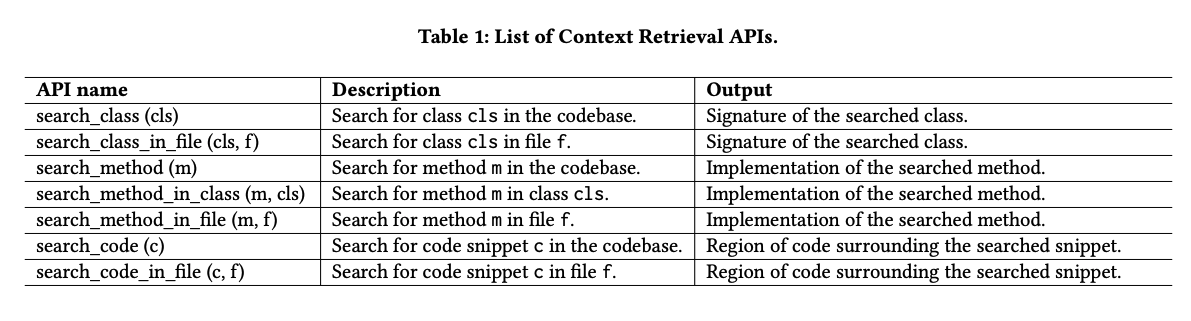
    <p><strong>SWE-agent (</strong><a href="https://arxiv.org/abs/2405.15793">Yang et al. 2024</a>) , <a href="https://github.com/OpenDevin/OpenDevin">OpenDevin</a> (<a href="https://arxiv.org/abs/2407.16741">Wang et al. 2024</a>) and AutoCodeRover (<a href="https://arxiv.org/abs/2404.05427">Zhang et al. 2024</a>) use bash and python-based utilities as tools to let agents search through and understand the files. The utilities are used by agents to perform high-level searches like searching a directory with keyword , searching  a file and more specific searches like searching for a class , method etc.</p>

    <p><img src="/assets/images/search_tools.png" alt="Untitled" /></p>

    <p>This helps in reducing the context provided to the agents. Rather than us deciding the context to be fed to the agents, with the search tools the agents decide the context needed to perform an action.</p>

    <p><a href="https://arxiv.org/abs/2405.15793">Yang et al. 2024</a> further control the context by restricting the search results to almost 50 results and if the results are not satisfactory, the model is prompted to search with a more specific query. The authors find that using these search tools improves the pass rate of tasks.</p>
  </li>
  <li>
    <h3 id="file-context">File context:</h3>

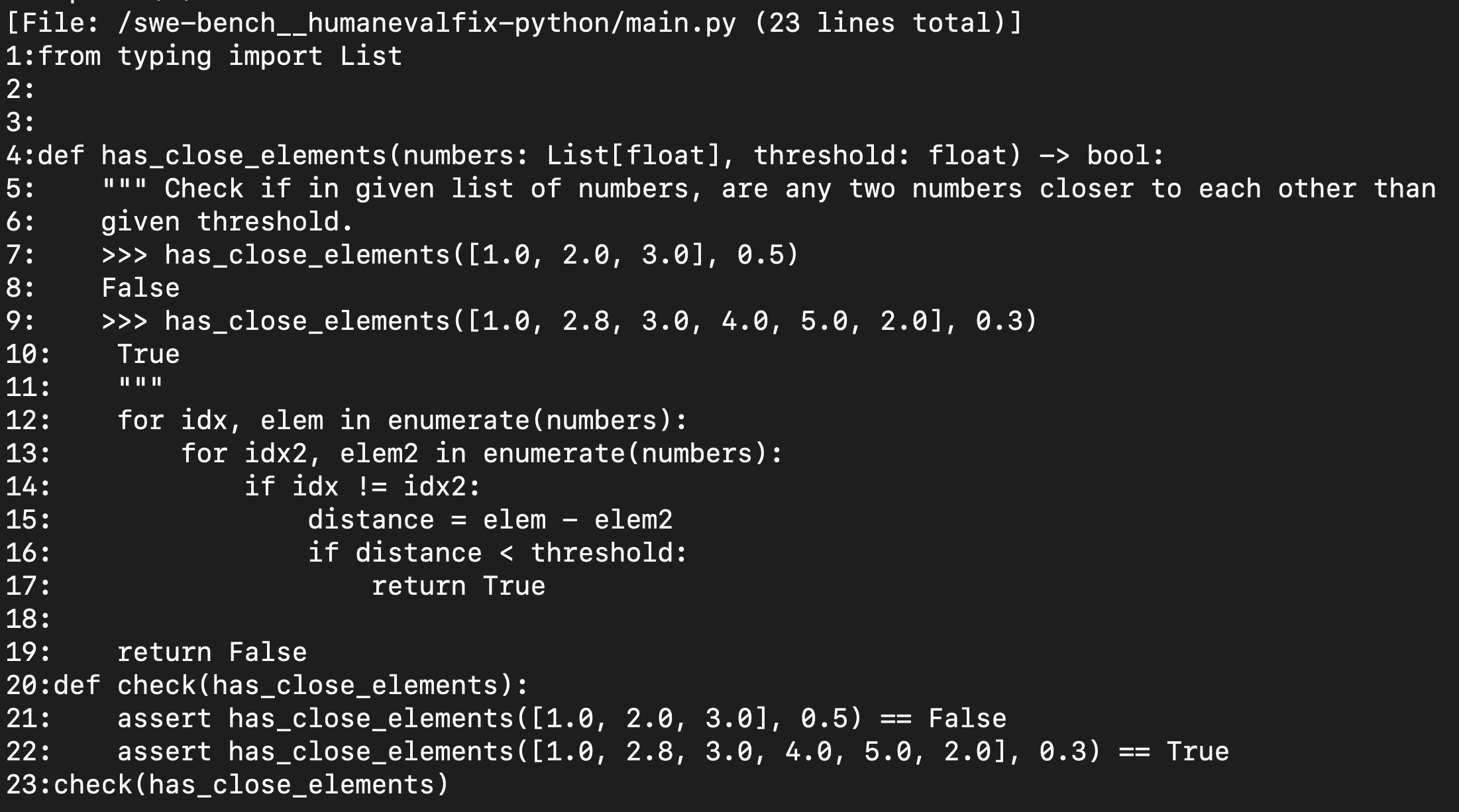
    <p>Similar to repo context, It is inefficient to provide the full context of a file to the agent at once. SWE-Agent (<a href="https://arxiv.org/abs/2405.15793">Yang et al. 2024</a>) and <a href="https://github.com/OpenDevin/OpenDevin">OpenDevin</a> (<a href="https://arxiv.org/abs/2407.16741">Wang et al. 2024</a>) use several utilities to control the context.</p>

    <ol>
      <li><code class="language-plaintext highlighter-rouge">Open</code>:  The file viewer presents a window of at most 100 lines of the file at a time</li>
      <li><code class="language-plaintext highlighter-rouge">scroll_down</code> and <code class="language-plaintext highlighter-rouge">scroll_up</code> : Move the window up and down</li>
      <li><code class="language-plaintext highlighter-rouge">goto</code> : access a specific line</li>
    </ol>

    <p>The code in the file viewer is enumerated with line numbers. This helps the model to use the correct line numbers while editing the file.</p>

    <p>The file viewer has important additional details like the full path of the open file, the total number of lines in the file, and the number of lines omitted before and after the current window. This helps the model to understand that there are more lines in the file and it can scroll up or down to access further context when needed.</p>

    <p><img src="/assets/images/file_viewer.png" alt="Untitled" /></p>
  </li>
  <li>
    <h3 id="localisation-from-the-repository-to-code-location">Localisation from the repository to code location:</h3>

    <ul>
      <li>
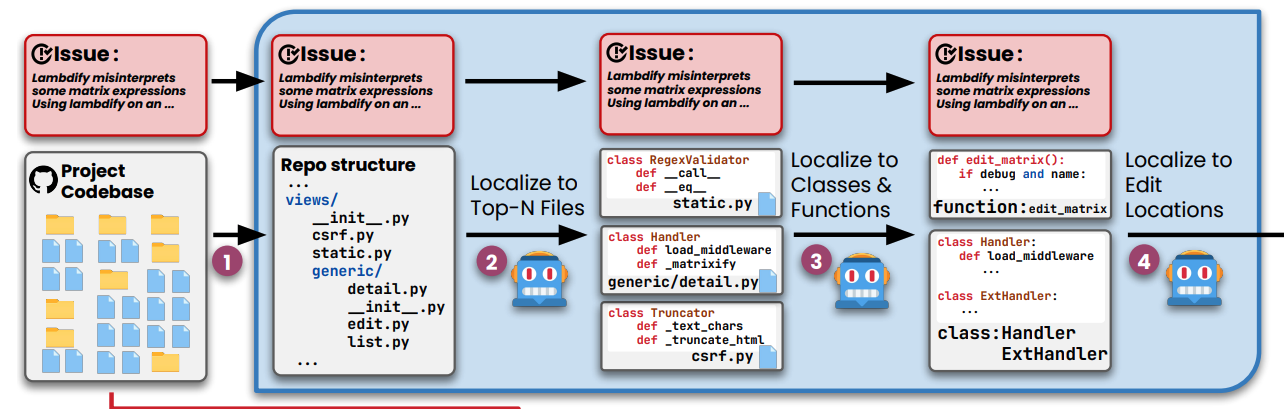
        <p>To localize the code lines to be changed from the repository level context Agentless (<a href="https://arxiv.org/abs/2407.01489">Xia et al. 2024</a>) takes a multistep approach. They first pass the repository structure ( discussed above) to the model and ask it to generate the Top N most probable files that should be edited for a given feature or a fix.</p>

        <p>The skeleton ( important symbols and definition) of these shortlisted files is provided as context to further shortlist the specific list of classes and functions that should be edited. The complete code of these shortlisted locations is prompted to the model for editing.</p>
      </li>
    </ul>

    <p><img src="/assets/images/localization.png" alt="Untitled" /></p>

    <ul>
      <li>Aider takes a more practical and human-in-the-loop approach to file localisation, The files to be edited are expected to be added to the Aider’s chat by the user. This workflow would avoid failure modes of the wrong file being edited or the model getting stuck in editing the wrong file.</li>
    </ul>
  </li>
  <li>
    <h3 id="spectrum-based-fault-localization-sbfl">Spectrum-based Fault Localization (SBFL):</h3>

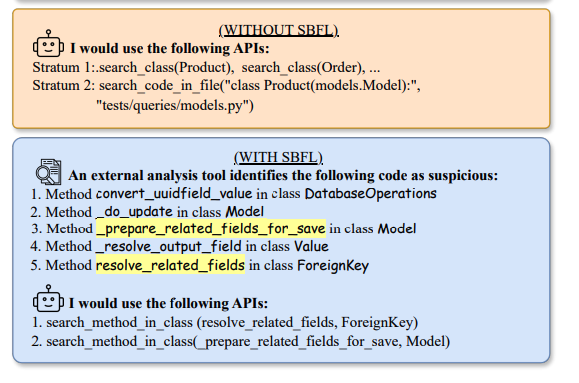
    <p>Autocoderover (<a href="https://arxiv.org/abs/2404.05427">Zhang et al. 2024</a>) uses an external tool to suggest probable locations of fault using a method called Spectrum-based Fault Localization . Given a test suite containing passing and failing tests, SBFL considers control-flow differences in the passing and failing test executions and assigns a suspiciousness score to different program locations. These suspicious locations are fed to the LLM to further identify the most likely locations of errors</p>
    <div style="text-align: center;">
 <img src="/assets/images/sbfl.png" />
 <p style="font-size: medium;"><em>SBFL from Autocoderover (Zhang et al. 2024))</em></p>
 </div>
  </li>
</ol>

<h2 id="patch-generation">Patch generation:</h2>

<p>The next step after localisation is to generate a code change to fix or add a new feature. A trivial approach to this would be to generate the code file from scratch (as a whole) for every edit, but this is inefficient, time consuming and can be limited by the context. Let’s discuss more efficient alternatives for edit generation in this section.</p>

<ol>
  <li>
    <h3 id="editing-with-line-numbers-">Editing with line numbers :</h3>

    <p><strong>SWE-agent (</strong><a href="https://arxiv.org/abs/2405.15793">Yang et al. 2024</a>) ( and previously <a href="https://github.com/OpenDevin/OpenDevin">OpenDevin</a> (<a href="https://arxiv.org/abs/2407.16741">Wang et al. 2024</a>) ) uses line numbers to specify the range of lines that are to be edited. The line range in the file is replaced with the code specified in the command.</p>

    <p><img src="/assets/images/patch_edit.png" alt="Sample edit command from SWE-AGENT, the line 1475 in the code file is replaced with the code in the command" /></p>

    <p style="font-size: medium;"><em>Sample edit command from SWE-AGENT, the line 1475 in the code file is replaced with the code in the command</em></p>

    <p>This method is efficient in terms of token usage and could also lead to a higher success rate of edits getting executed. But it also leads to some of the common failure modes:</p>

    <ul>
      <li><strong>Models are bad at tracking line numbers</strong>: Even if the file context interface is always shown with line numbers, with consecutive edits throughout the task lifecycle the line numbers change often. This results in the model invoking the command with wrong line numbers resulting in incorrect edits and syntax errors.</li>
      <li><strong>Actions do not always match the intention</strong>: This is not only specific to this editing approach, but it is prevalent with this one.  The model would intend to change a set of lines ( like an <code class="language-plaintext highlighter-rouge">if</code> block) but it would end up specifying the line range of just few lines of the block instead of the complete ones ( like just the <code class="language-plaintext highlighter-rouge">if</code> condition line ) leading to errors.</li>
    </ul>
  </li>
  <li>
    <h3 id="line-diff-format">Line diff format:</h3>

    <p>An alternate approach is to let the model generate edits in <a href="https://en.wikipedia.org/wiki/Diff#Unified_format">unified diff format</a> , which is a standard way of displaying the changes between code files and the models are more likely to be familiar with this approach due to its familiarity during pretraining. However, this approach necessitates the model to generate several unchanged lines before and after the actual change lines.</p>

    <p><img src="/assets/images/line_dff_1.png" alt="An example of Unified diff format from OctoPack: Instruction Tuning Code Large Language Models. Muennighoff et al. 2023" /></p>

    <p style="font-size: medium;"><em>An example of Unified diff format from 
 OctoPack: Instruction Tuning Code Large Language Models. Muennighoff et al. 2023</em></p>

    <p><a href="https://arxiv.org/abs/2308.07124">Muennighoff et al. 2023</a> introduce a simplified diff format called line diff format. Requiring only the lines of change to be shown ( along with line numbers) instead of additional lines as in unidiff format. <a href="https://arxiv.org/abs/2308.07124">Muennighoff et al. 2023</a>  show that fine-tuning models with this format perform better than the unidiff format on the zero-shot HumanEvalFix dataset.</p>

    <p><img src="/assets/images/line_diff_2.png" alt="An example of line diff format from OctoPack: Instruction Tuning Code Large Language Models. Muennighoff et al. 2023" /></p>

    <p style="font-size: medium;"><em>An example of line diff format from OctoPack: Instruction Tuning Code Large Language Models. Muennighoff et al. 2023</em></p>
  </li>
  <li>
    <h3 id="search-and-replace-diff-string-format">Search and replace diff string format:</h3>

    <p><a href="https://github.com/paul-gauthier/aider">Aider</a> uses another diff string-based edit format which is shown to perform the best in their code editing <a href="https://aider.chat/docs/leaderboards/">benchmark</a>.  The format uses a fenced code block that specifies the file name, and lines of code to be replaced followed by new code lines in the replace block.</p>

    <p>Even though this approach consumes a lot more tokens than the line number-based approach, it seems to handle the common failures better.</p>

    <div class="language-bash highlighter-rouge"><div class="highlight"><pre class="highlight"><code> <span class="c"># Here are the changes you requested to demo.py:</span>

 demo.py
 <span class="o">&lt;&lt;&lt;&lt;&lt;&lt;</span>&lt; SEARCH
     print<span class="o">(</span><span class="s2">"hello"</span><span class="o">)</span>
 <span class="o">=======</span>
     print<span class="o">(</span><span class="s2">"goodbye"</span><span class="o">)</span>
 <span class="o">&gt;&gt;&gt;&gt;&gt;&gt;&gt;</span> REPLACE
</code></pre></div>    </div>

    <p>But from my personal experience, this approach is also not perfect and also leads to some of the common failure modes:</p>

    <ul>
      <li><strong>Edit failures due to additional lines</strong>: When the models generate the code in the search block, it sometimes hallucinates additional lines which are not in the original file. This leads to edits not being applied because of a lack of exact match with the original code.</li>
      <li><strong>Edit failures due to missing lines:</strong> This is the opposite of the above case, the model sometimes fails to mention the empty new lines or comments from the original file leading to no exact match</li>
      <li><strong>Actions do not always match the intention</strong>: Even this approach has the issue of the model missing the full code block that it intends to change, mentioning only the partial lines.</li>
    </ul>
  </li>
  <li>
    <h3 id="linting-before-applying-edits">Linting before applying edits:</h3>

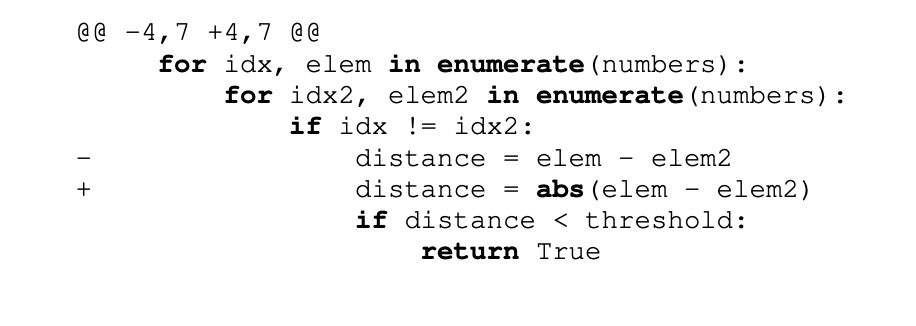
    <p><strong>SWE-agent (</strong><a href="https://arxiv.org/abs/2405.15793">Yang et al. 2024</a>) study that linting the code to check for syntax errors before applying the code improves the overall pass rate by 3% on SWE-bench  tasks.</p>

    <p><img src="/assets/images/lint_flow.png" alt="Examples with and without linting from **SWE-agent (**[Yang et al. 2024](https://arxiv.org/abs/2405.15793))" /></p>

    <p>Examples with and without linting from <strong>SWE-agent (</strong><a href="https://arxiv.org/abs/2405.15793">Yang et al. 2024</a>)</p>

    <p><img src="/assets/images/lint_result.png" alt="Untitled" /></p>
  </li>
  <li>
    <h3 id="post-edit">Post edit:</h3>

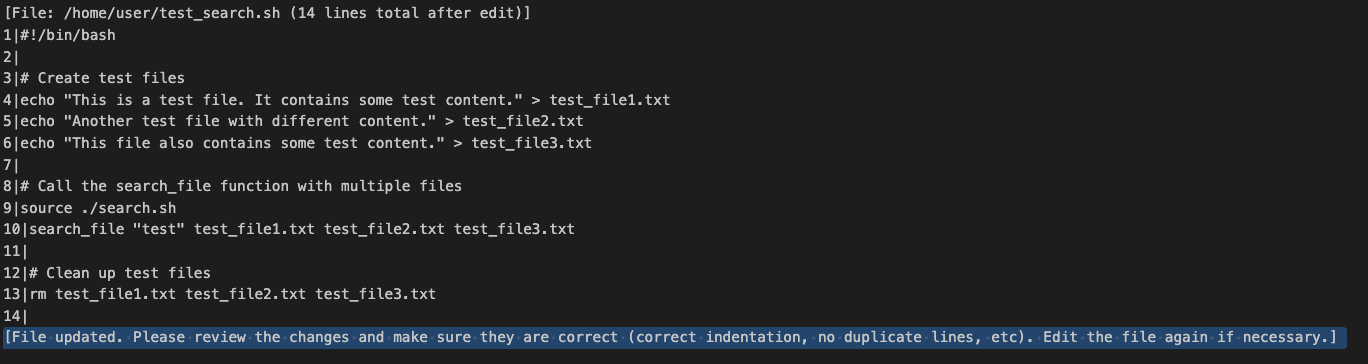
    <p><strong>SWE-agent (</strong><a href="https://arxiv.org/abs/2405.15793">Yang et al. 2024</a>) and <a href="https://github.com/OpenDevin/OpenDevin">OpenDevin</a> (<a href="https://arxiv.org/abs/2407.16741">Wang et al. 2024</a>) show the edited location along with a window of a few top and bottom lines to the model after the edit is applied. This helps the model to look for any duplicates or mistakes that are introduced in the edit and rectify the same via the next actions</p>

    <p><img src="/assets/images/post_edit.png" alt="Example of a file viewer shown after file edit with a prompt to followup with further actions on edit mistakes" /></p>

    <p style="font-size: medium;"><em>Example of a file viewer shown after file edit with a prompt to followup with further actions on edit mistakes</em></p>
  </li>
</ol>

<h2 id="open-challenges">Open challenges:</h2>

<p>In conclusion, here are some of the open challenges or limiting factors for the models in handling SWE tasks:</p>

<ul>
  <li><strong>File edits are messy</strong>: With the current capabilities and existing interfaces ( more so) the file editing process is messy and inefficient compared to code generation from scratch. It goes through numerous iterations and with more tries the chances of the model getting stuck in a loop increases.</li>
  <li><strong>Extending the context from programs to systems</strong>: The current approaches are more focussed on the models to work at a program/file level but the capabilities to interact and design at the system level and architect a software system are still missing.</li>
  <li><strong>Leveraging human developer interfaces</strong>: With improving multi-modal abilities of the models and models entering our desktops ( <a href="https://openai.com/chatgpt/mac/">this</a> and <a href="https://multi.app/blog/multi-is-joining-openai">this</a> ). The agent interface could be just a transitioning phase till the models can truly leverage the years of dev tooling that have been honed by humans.</li>
</ul>

<h2 id="citation">Citation</h2>

<div class="language-bibtex highlighter-rouge"><div class="highlight"><pre class="highlight"><code><span class="nc">@article</span><span class="p">{</span><span class="nl">umapathi2024agentinterfaces</span><span class="p">,</span>
  <span class="na">title</span>   <span class="p">=</span> <span class="s">"Agent Interfaces: Bridging LLMs and Software Engineering"</span><span class="p">,</span>
  <span class="na">author</span>  <span class="p">=</span> <span class="s">"Umapathi, Logesh Kumar"</span><span class="p">,</span>
  <span class="na">journal</span> <span class="p">=</span> <span class="s">"logeshumapathi.com"</span><span class="p">,</span>
  <span class="na">year</span>    <span class="p">=</span> <span class="s">"2024"</span><span class="p">,</span>
  <span class="na">month</span>   <span class="p">=</span> <span class="s">"Aug"</span><span class="p">,</span>
  <span class="na">url</span>     <span class="p">=</span> <span class="s">"https://logeshumapathi.com/blog/2024/08/03/agent-interfaces.html"</span>
<span class="p">}</span>
</code></pre></div></div>

<h2 id="references">References</h2>
<ul>
  <li>Xia et al. 2024. <a href="https://arxiv.org/abs/2407.01489">“Agentless: Demystifying LLM-based Software Engineering Agents”</a></li>
  <li>Gauthier, P. <a href="https://github.com/paul-gauthier/aider">“Aider”</a>.</li>
  <li>Muennighoff et al. (2023). <a href="https://arxiv.org/abs/2308.07124">“OctoPack: Instruction Tuning Code Large Language Models”</a></li>
  <li>Yang et al. 2024. <a href="https://arxiv.org/abs/2405.15793">“SWE-Agent: Agent-Computer Interfaces Enable Automated Software Engineering”</a></li>
  <li>Wang et al. 2024. <a href="https://arxiv.org/abs/2407.16741">“OpenDevin: An Open Platform for AI Software Developers as Generalist Agents.”</a></li>
  <li>Zhang et al. 2024. <a href="https://arxiv.org/abs/2404.05427">“AutoCodeRover: Autonomous Program Improvement”</a></li>
  <li><a href="https://github.com/FSoft-AI4Code/RepoPilot">“RepoPilot: Multi-Agent Coding Assistant that Understand Your Codebase”</a></li>
</ul>]]></content><author><name></name></author><category term="blog" /><summary type="html"><![CDATA[It is well-established that LLMs are useful at coding. With the ongoing advancement in their code refinement abilities with execution feedback, and increasing context length, coupled with decreasing costs,it is becoming apparent that LLMs will play a significant role in software development and likey to surpass human contribution.]]></summary></entry><entry><title type="html">How to do more with less data ?— Active learning</title><link href="https://infinitylogesh.github.io/blog/2020/09/26/active_learning_do_more_.html" rel="alternate" type="text/html" title="How to do more with less data ?— Active learning" /><published>2020-09-26T00:00:00+00:00</published><updated>2020-09-26T00:00:00+00:00</updated><id>https://infinitylogesh.github.io/blog/2020/09/26/active_learning_do_more_</id><content type="html" xml:base="https://infinitylogesh.github.io/blog/2020/09/26/active_learning_do_more_.html"><![CDATA[<p><img src="https://miro.medium.com/v2/resize:fit:720/format:webp/0*gRCw9OD-7RnMUq69" alt="hero" /></p>
<div style="text-align: center;">
<p style="font-size: medium;"><em> Photo by Prateek Katyal on Unsplash</em></p>
</div>

<p>If the machine learning projects are icebergs, then the parts that are underwater are the labelling and other data efforts that go into the project. The good news is techniques like transfer learning and active learning could help in reducing the effort.</p>

<p>Active learning has been part of the toolbox of ML industry practitioners for a while but rarely covered in any of the data science / ML courses. Reading the book <a href="https://www.manning.com/books/human-in-the-loop-machine-learning">Human in the loop machine learning</a> by <a href="http://www.robertmunro.com/">Robert Munro</a>, helped me formalise some ( and helped me learn many ) of the active learning concepts that I had been using intuitively for my ML projects.</p>

<p>The intent of this article is to introduce you to a simple active learning method called ‘<em>Uncertainty sampling with entropy</em>’ and demonstrate its usefulness with an example. For the demonstration, I have used Active learning to utilize only <strong>23%</strong> of the actual training dataset ( <a href="https://www.kaggle.com/hassanamin/atis-airlinetravelinformationsystem#">ATIS intent classification dataset</a>) to achieve the same result as training on 100% of the dataset.</p>

<p>Too curious? Jump straight to the <a href="https://colab.research.google.com/drive/1BsTuFK8HcXS5WWlOCS1QHgvHRf2FK6aD?usp=sharing">demo</a>. Want to first understand how it works? Read on.</p>

<h2 id="what-is-active-learning"><strong>What is active learning?</strong></h2>

<p>Active learning is about training our models preferentially on the labelled examples that could give the biggest bang for our buck rather than on the examples with very less “learning signal”. The estimation of an example’s learning signal is done using the feedback from the model.</p>

<p>This is akin to a teacher asking a student about the concepts that she is hazy about and giving preference to those concepts, rather than teaching all of the curricula.</p>

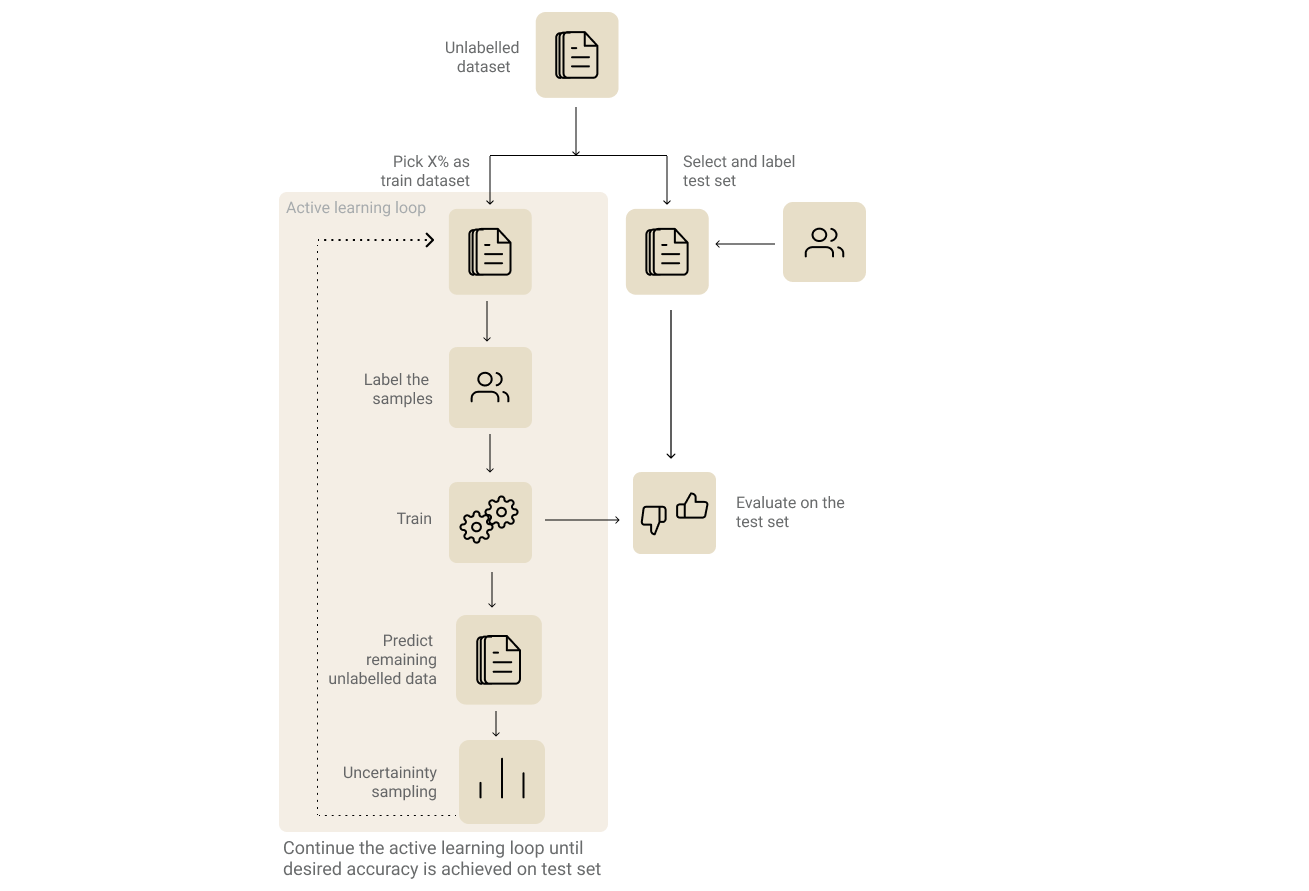
<p>Since active learning is an iterative process, you would have to go through multiple rounds of training. Steps involved in active learning are:</p>

<p><img src="https://cdn-images-1.medium.com/max/2618/1*2uhvFkBfUBoWa3KtkvMpeQ.png" alt="Active learning process" /></p>
<div style="text-align: center;">
<p style="font-size: medium;"><em>Active learning process</em></p>
</div>

<h2 id="1-identify-and-label-your-evaluation-dataset"><strong>1. Identify and label your evaluation dataset.</strong></h2>

<p>It goes without saying that choosing an evaluation set is the most important step in any machine learning process. This becomes even more crucial when it comes to active learning since this will be our measure of how well our model performance improves during our iterative labelling process. Furthermore, it also helps us decide when to stop iterating.</p>

<p>The straight forward approach would be to randomly split the unlabelled dataset and pick your evaluation set from that split dataset. But based on the complexity or the business need, it is also good to have multiple evaluation sets. For example, If your business need dictates that a sentiment analysis model should handle sarcasm well, you could have two separate evaluation sets — one for generic sentiment analysis and other for sarcasm specific samples.</p>

<h2 id="2-identify-and-label-your-initial-training-dataset">2. <strong>Identify and label your initial training dataset.</strong></h2>

<p>Now pick X% of the unlabeled dataset as the initial training dataset. The value of X could vary based on the model and the complexity of the approach. Pick a value that is quick enough for multiple iterations and also big enough for your models to train on initially. If you are going with a transfer learning approach and the distribution of the dataset is close to the pre-training dataset of the base model, then a lower value of X would be good enough to kick start the process.</p>

<p>It would also be a good practice to avoid class-imbalance in the initial training dataset. If it’s an NLP problem, you could consider a keyword-based search to identify samples from a particular class to label and maintain class balance.</p>

<h2 id="3-training-iteration">3. <strong>Training Iteration</strong></h2>

<p>Now that we have the initial training and evaluation dataset, we can go ahead and do the first training iteration. Usually, one cannot infer much by evaluating the first model. But the results from the step could help us see how the predictions improve over the iterations. Use the model to predict labels of the remaining unlabelled samples.</p>

<h2 id="4-choose-the-subset-of-samples-to-be-labelled-from-the-previous-step">4. <strong>Choose the subset of samples to be labelled from the previous step.</strong></h2>

<p>This is a crucial step where you select samples with the most learning signals for labelling processes. There are several ways to go about doing it (as explained in the book). In the interest of brevity, we will see the method that I felt to be most intuitive of all — Uncertainty sampling based on entropy.</p>

<p><strong>Entropy-based Uncertainty Sampling :</strong></p>

<p>Uncertainty sampling is a strategy to pick samples that the model is most uncertain/confused about. There are several ways to calculate the uncertainty. The most common way is to use the classification probability (softmax) values from the final layer of the neural network.</p>

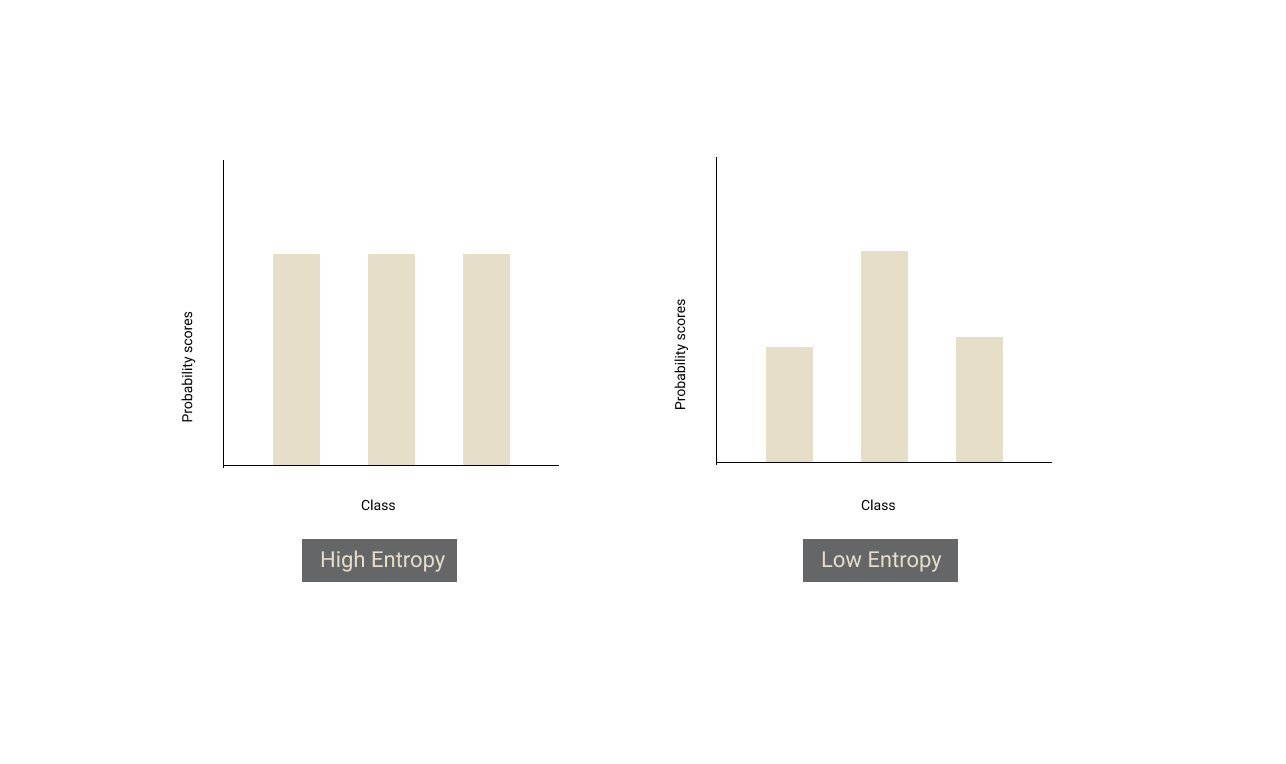
<p>If there is no clear winner (i.e all the probabilities are almost the same), it means that the model is uncertain about the sample. Entropy exactly gives us a measure of that. If there is a tie between all the classes, entropy of the distribution will be high and if there is a clear winner amongst the classes, the entropy of the distribution will be low.</p>

<p><img src="https://cdn-images-1.medium.com/max/2572/1*vqlB9Y6taLMVTSskVwzSXw.png" alt="" /></p>

<p>From the model’s predictions of the unlabelled dataset, we should sort the samples in descending order of entropy and pick some Y% of top samples to annotate.</p>

<h2 id="5-rinse--repeat-"><strong>5. Rinse &amp; Repeat :</strong></h2>

<p>We need to append the training dataset from this iteration with the new samples that we labelled and repeat the process from step 3, until we reach the desired performance on our evaluation set or our evaluation performance plateaus.</p>

<h2 id="demo"><strong>Demo</strong></h2>

<p>For the sake of experiment and demonstration, we will use <a href="https://www.kaggle.com/hassanamin/atis-airlinetravelinformationsystem">ATIS intent classification dataset</a>. Let’s consider the training dataset as unlabelled. We start by taking a random 5% of the labelled training dataset for our first iteration. At the end of each iteration, we use entropy-based uncertainty sampling to pick top 10% of the samples and use their labels (simulating the annotation process in the real world) for training in the next iteration.</p>

<p>To evaluate our models during each iteration of active learning, we also take the test set from the dataset since the data in the test set is already labelled.</p>

<p>Demo and code is available in the notebook below:
<a href="https://colab.research.google.com/drive/1BsTuFK8HcXS5WWlOCS1QHgvHRf2FK6aD?usp=sharing"><strong>Google Colaboratory</strong>
colab.research.google.com</a></p>

<p><strong>References :</strong></p>

<ol>
  <li>
    <p>David D. Lewis and William A. Gale. 1994. A Sequential Algorithm for Training Text Classifiers. SIGIR’94, <a href="https://arxiv.org/pdf/cmp-lg/9407020.pdf">https://arxiv.org/pdf/cmp-lg/9407020.pdf</a></p>
  </li>
  <li>
    <p><a href="https://www.manning.com/books/human-in-the-loop-machine-learning">Human in the loop machine learning</a> by <a href="http://www.robertmunro.com/">Robert Munro</a></p>
  </li>
</ol>

<p>Thanks to <a href="undefined">Sriram Pasupathi</a> for taking a greater effort in proofreading this article than what it took me to write this article 🙏</p>

<p>**P.S: I would be really glad to hear your feedback on this article, that would also push me to write the other articles in the series on “How to do more with less data” **👋</p>]]></content><author><name></name></author><category term="blog" /><summary type="html"><![CDATA[Photo by Prateek Katyal on Unsplash]]></summary></entry><entry><title type="html">What does a Fine-tuned BERT model look at ?.</title><link href="https://infinitylogesh.github.io/blog/2019/11/28/Fine-tuned-BERT.html" rel="alternate" type="text/html" title="What does a Fine-tuned BERT model look at ?." /><published>2019-11-28T00:00:00+00:00</published><updated>2019-11-28T00:00:00+00:00</updated><id>https://infinitylogesh.github.io/blog/2019/11/28/Fine-tuned-BERT</id><content type="html" xml:base="https://infinitylogesh.github.io/blog/2019/11/28/Fine-tuned-BERT.html"><![CDATA[<p>An attempt to understand features and patterns learnt by a Fine-tuned BERT model</p>

<p><img src="https://cdn-images-1.medium.com/max/7286/0*ToC_4We3OR9cC51L" alt="Photo by [Katarzyna Pe](https://unsplash.com/@kasiape?utm_source=medium&amp;utm_medium=referral) on [Unsplash](https://unsplash.com?utm_source=medium&amp;utm_medium=referral)" /></p>

<p style="font-size: medium;">
      <em>
        Photo by <a href="https://unsplash.com/@kasiape?utm_source=medium&amp;utm_medium=referral">Katarzyna Pe</a> on <a href="https://unsplash.com?utm_source=medium&amp;utm_medium=referral">Unsplash</a>
      </em>
    </p>

<p style="font-size: medium;"><em>*Note: This content was part of my talk at Analytics Vidhya’s DataHack Summit 2019.*</em></p>

<p>There is a lot of buzz around NLP of late, especially after the advancement in transfer learning techniques and with the advent of architectures like transformers. As someone from the applied side of Machine learning, I feel that it is not only important to have models that can surpass the state of the art results in many benchmarks, It is also important to have models that are trustable, understandable and not a complete black box.</p>

<p>This post is an attempt to understand the learnings of BERT on task-specific training. Let’s start with how attention is implemented in a Transformer and how it can be leveraged for understanding the model ( Feel free to skip this section if you are already aware of it).</p>

<h2 id="attention-attention">Attention! Attention!</h2>

<p>Transformers use self-attention to encode the representation of its input sequences at each layer. With self-attention, All the words in the input sequence contribute to the representation ( encoding ) of the current token.</p>

<p>Let’s consider this example from <a href="http://jalammar.github.io/illustrated-transformer/">Jalammar’s Blog</a> ( I would highly recommend reading his blog post for a deeper understanding of transformers ). Here you could see that the representation of the word “Thinking” ( Z1 ) is formed by the contribution from other words in the sentence ( in this case “Machines”). The strength of the contribution of each word to the current word is determined by the attention scores ( Softmax scores ). It is similar to each word giving a part of itself to form a full representation of the current word.</p>

<p><img src="https://cdn-images-1.medium.com/max/2000/1*CHuDH2Ivg-RSnBu_ZGUw8A.png" alt="Source: [http://jalammar.github.io/illustrated-transformer/](http://jalammar.github.io/illustrated-transformer/)" /><em>Source: <a href="http://jalammar.github.io/illustrated-transformer/">http://jalammar.github.io/illustrated-transformer/</a></em></p>

<p>The strength could be inferred as the semantic association of the words in the sentence to the current word. For example, the word “it” in the below visualization of an attention layer in a transformer, has a higher contribution from the words “The animal”. This could be inferred as a coreference resolution of the word “it”. This behaviour is what gives the transformers contextual representations/encodings.</p>

<p><img src="https://cdn-images-1.medium.com/max/2000/1*oQPfFrzu2E590NrFkELbSA.png" alt="Inferring association between tokens using attention. source: [http://jalammar.github.io/illustrated-transformer/](http://jalammar.github.io/illustrated-transformer/)" /><em>Inferring association between tokens using attention. source: <a href="http://jalammar.github.io/illustrated-transformer/">http://jalammar.github.io/illustrated-transformer/</a></em></p>

<p>These contribution strengths (attention scores) can be leveraged to understand the association between the tokens and thereby it can also be used to understand the learnings of the transformers. This is exactly what we are going to attempt in this post. We will try to understand the task-specific features learned by the transformer.</p>

<h2 id="task-specific-features-">Task-specific features :</h2>

<p>The paper — <a href="https://arxiv.org/abs/1906.04341">What does BERT look at ?</a> (Clark et al., 2019) which got published earlier this year talks about the various linguistic and coreference patterns that are self-learned by a BERT model. Illustrating how syntax-sensitive behaviour can emerge from self-supervised training alone. This made me curious and wanted to try doing a similar study on task-specific features that BERT learn, after finetuning on a task.</p>

<p><img src="https://cdn-images-1.medium.com/max/2000/1*QC9wifukkN7mTTpPlze2kg.png" alt="Example of Aspect based sentiment analysis — Source: [https://medium.com/seek-blog/your-guide-to-sentiment-analysis-344d43d225a7](https://medium.com/seek-blog/your-guide-to-sentiment-analysis-344d43d225a7)" /><em>Example of Aspect based sentiment analysis — Source: <a href="https://medium.com/seek-blog/your-guide-to-sentiment-analysis-344d43d225a7">https://medium.com/seek-blog/your-guide-to-sentiment-analysis-344d43d225a7</a></em></p>

<h3 id="the-task-at-hand-">The Task at hand :</h3>

<p>The finetuning task that we would be using here is an <a href="https://monkeylearn.com/blog/aspect-based-sentiment-analysis/">Aspect-Based sentiment analysis</a> task designed as a question answering / multi-class classification problem. This approach is inspired by this <a href="https://arxiv.org/pdf/1903.09588v1.pdf">paper</a> (Sun et al.,2019). With this approach of converting the sentiment dataset into question-answer pairs (as shown below ), the authors were able to achieve state of the art results on SEMEVAL <a href="http://alt.qcri.org/semeval2014/">dataset</a>.</p>

<p><img src="https://cdn-images-1.medium.com/max/3008/1*sKomk2sUs90Uzk_XxIjjWw.png" alt="Aspect-based sentiment analysis as QA — [https://arxiv.org/pdf/1903.09588v1.pdf](https://arxiv.org/pdf/1903.09588v1.pdf)" /><em>Aspect-based sentiment analysis as QA — <a href="https://arxiv.org/pdf/1903.09588v1.pdf">https://arxiv.org/pdf/1903.09588v1.pdf</a></em></p>
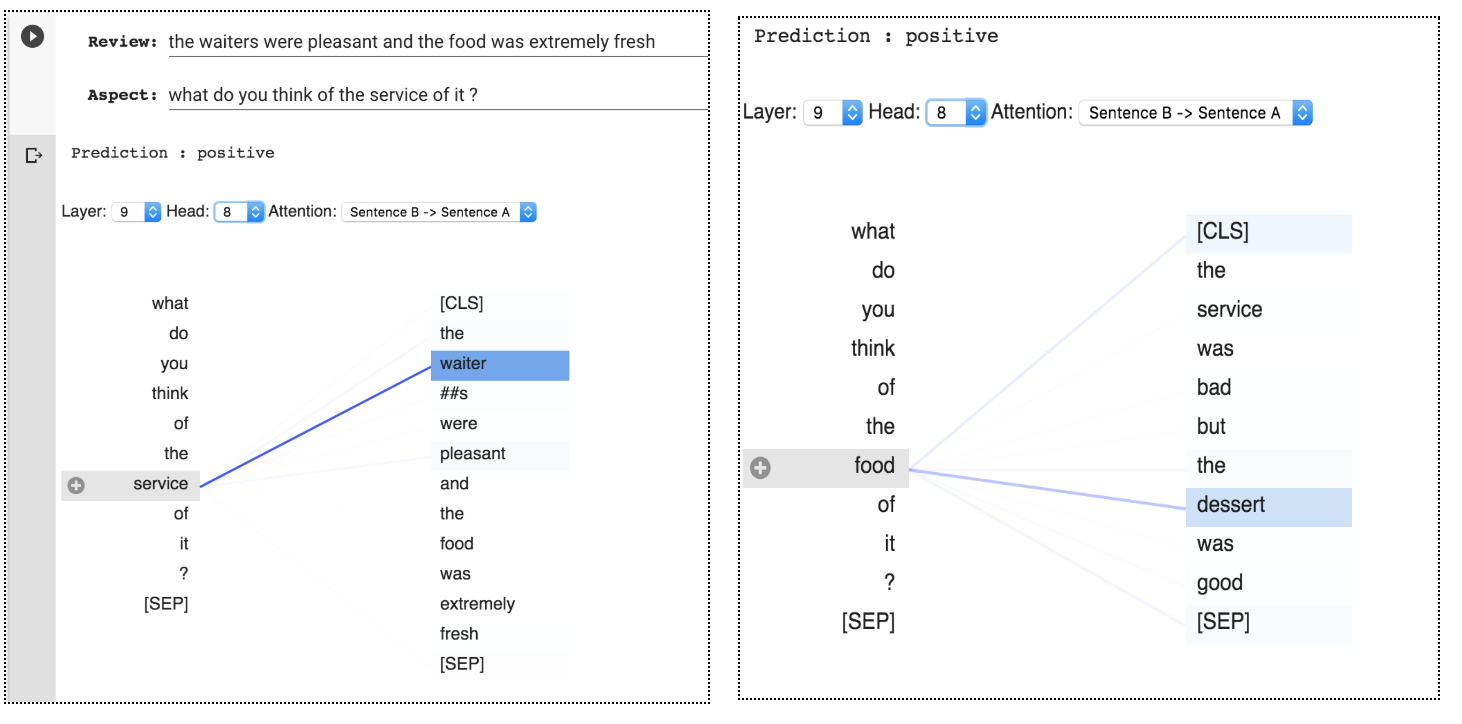
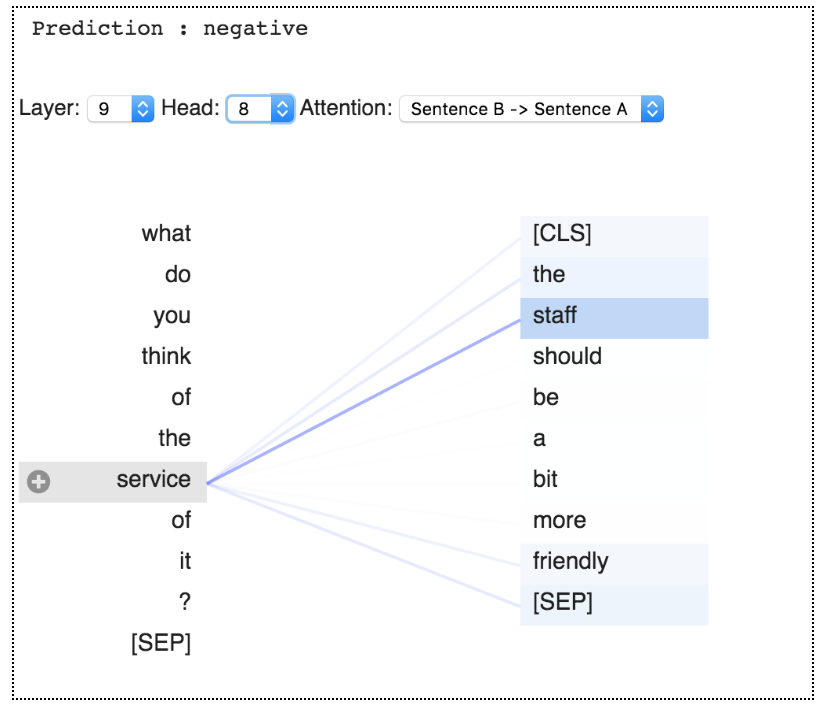
<p>I have finetuned a BERT-base-uncased model on SEMEVAL 2014 dataset using huggingface’s <a href="https://github.com/huggingface/transformers">transformers</a> library and visualized the attention maps using <a href="https://github.com/jessevig/bertviz">bertviz</a>.</p>

<h2 id="task-specific-learnings-">Task-specific learnings :</h2>

<p>Here I list a few of the interesting patterns that I observed by probing attention layers of the fine-tuned BERT model,</p>

<ol>
  <li><strong><em>Aspect heads — Aspect word understanding</em></strong> :</li>
</ol>

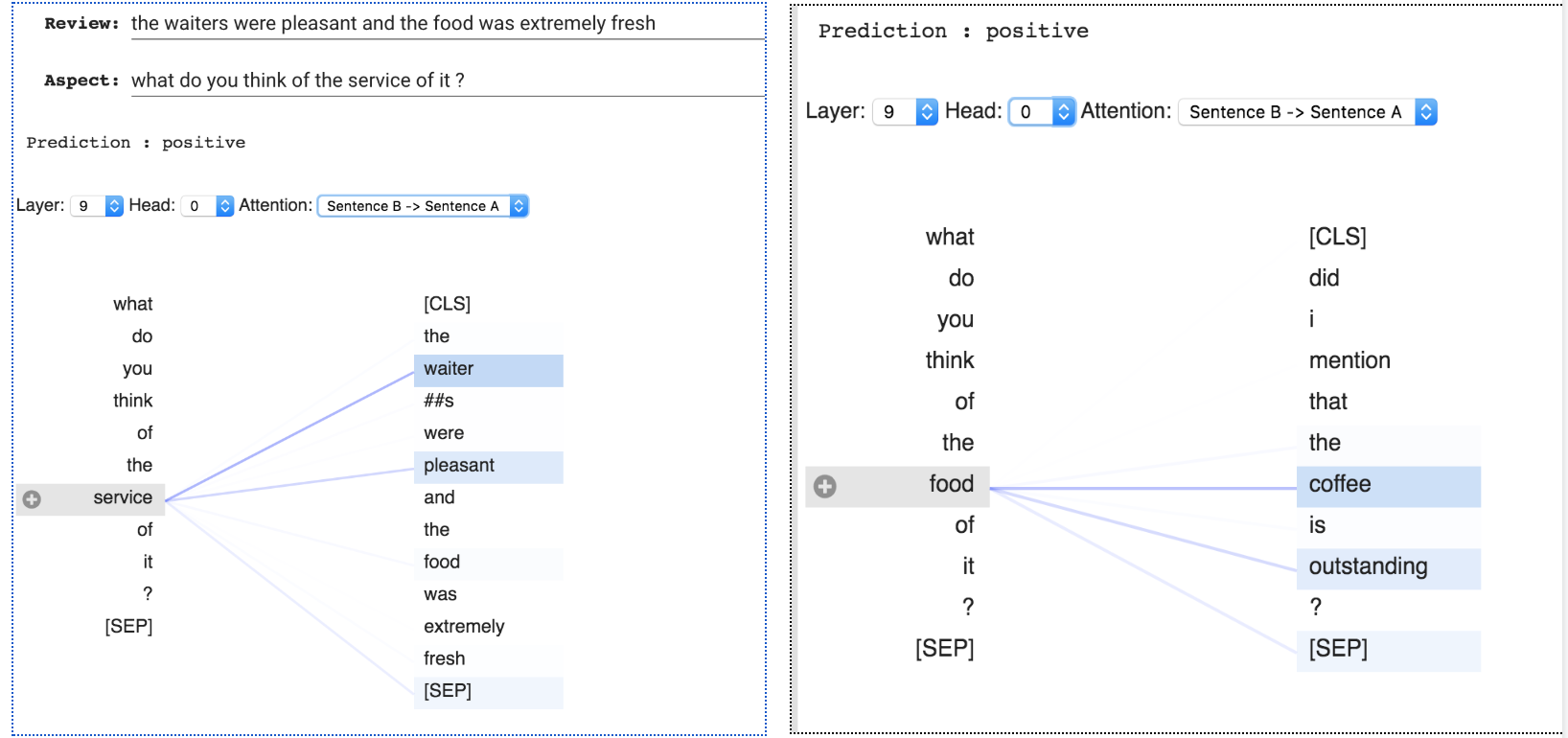
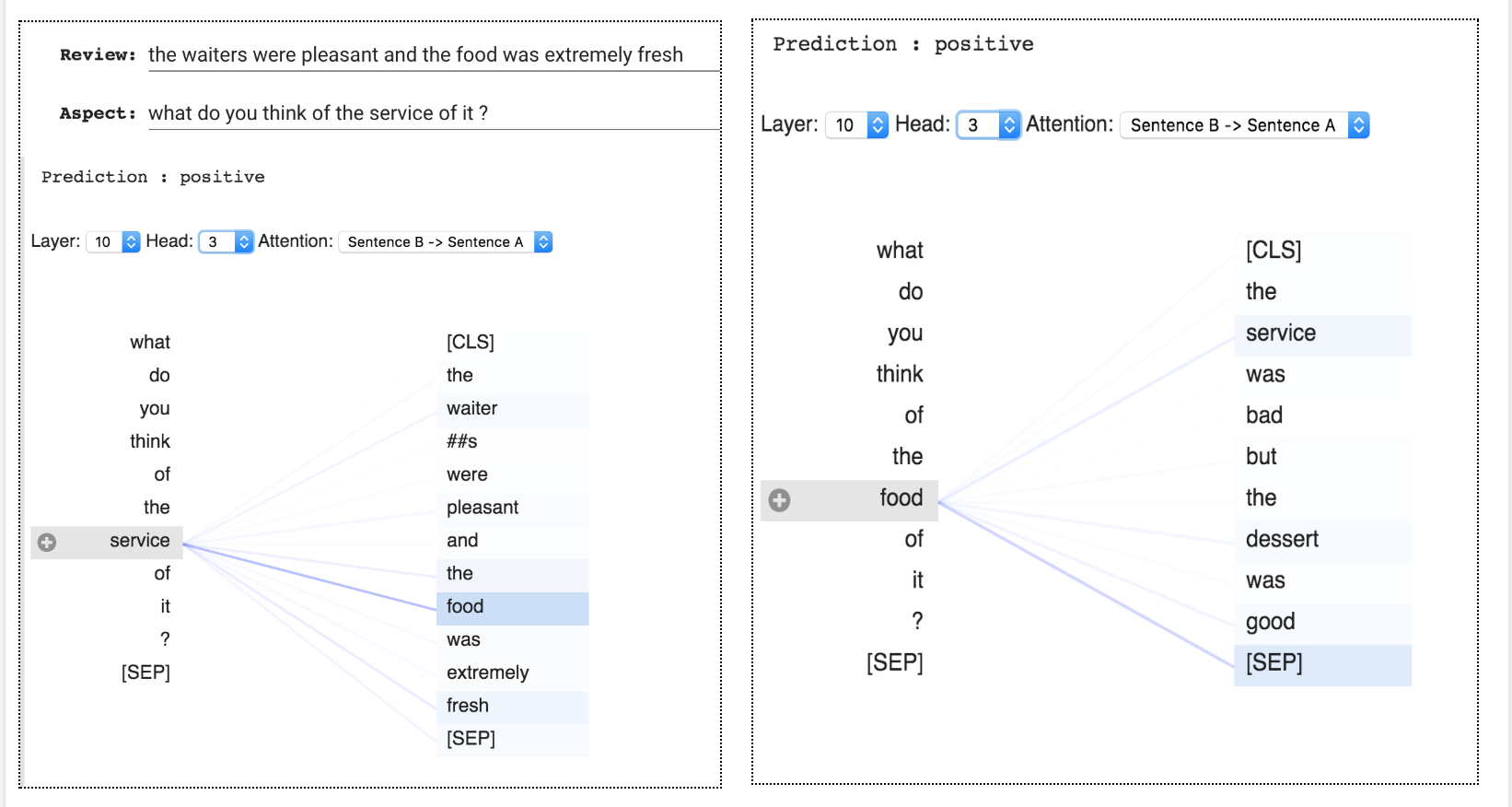
<p>I observed that head 9-8 mostly attends to the aspect related words in the review, that correspond to the aspect in the question ( word “service” in the below pictures gets a very high attention score from the word “waiter”). The aspect word in question (left side) in most cases have a higher contribution from the aspect word in the review ( right side ). So this could be considered to act as an aspect head.</p>

<p><img src="https://cdn-images-1.medium.com/max/2924/1*tE3OqQJ459bG9OpcVQv09w.png" alt="" /></p>

<p><img src="https://cdn-images-1.medium.com/max/2000/1*phFGXjQcWzVkIXLjRyRowg.png" alt="" /></p>

<p><strong><em>2. Aspect-sentiment heads — Aspect word and related sentiment words understanding :</em></strong></p>

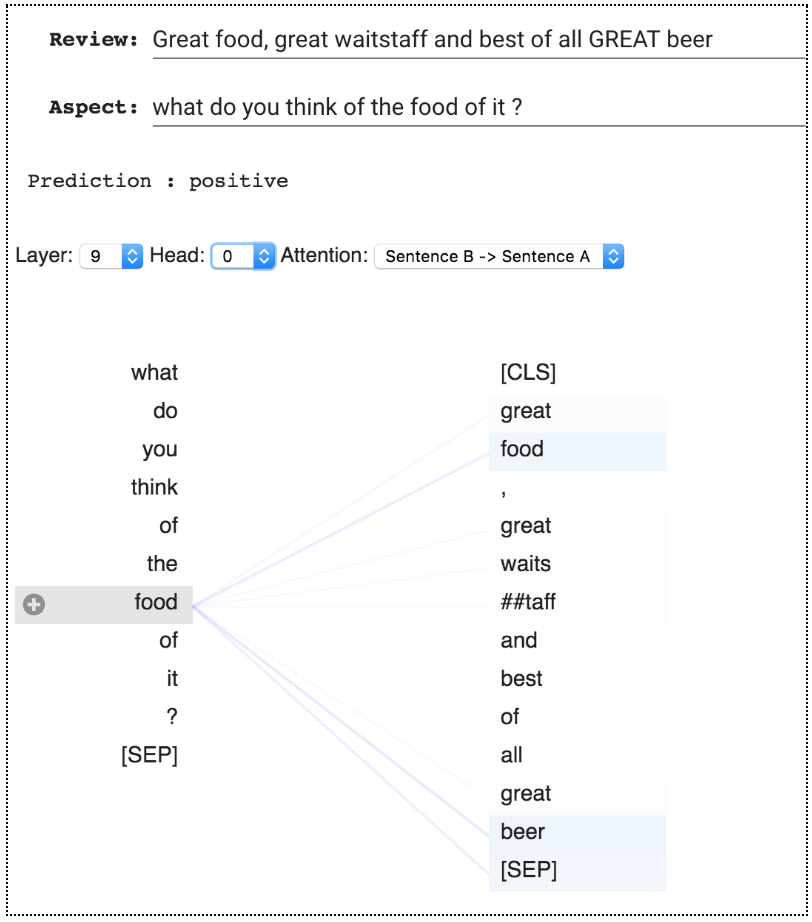
<p>Here we can see examples of head 9-0 mostly focusing on aspects words that are related to the question and their corresponding sentiment words.</p>

<p><img src="https://cdn-images-1.medium.com/max/3272/1*MVMLwoachy_URr46NXfhfw.png" alt="" /></p>

<p><img src="https://cdn-images-1.medium.com/max/2000/1*8MGfWQOaPcrv1kFvkN_uQw.png" alt="" /></p>

<p><strong><em>3. Phrase level attention to aspect and sentiments :</em></strong></p>

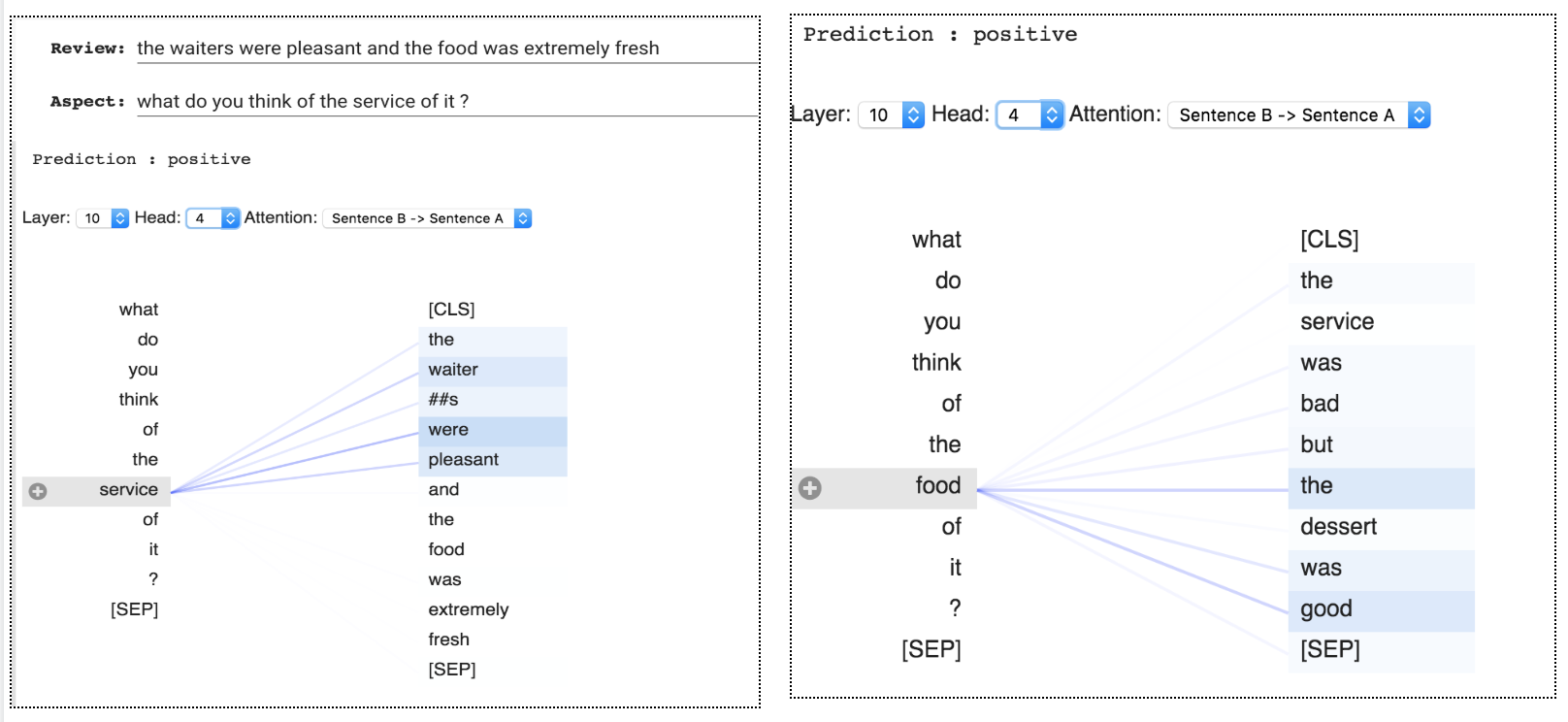
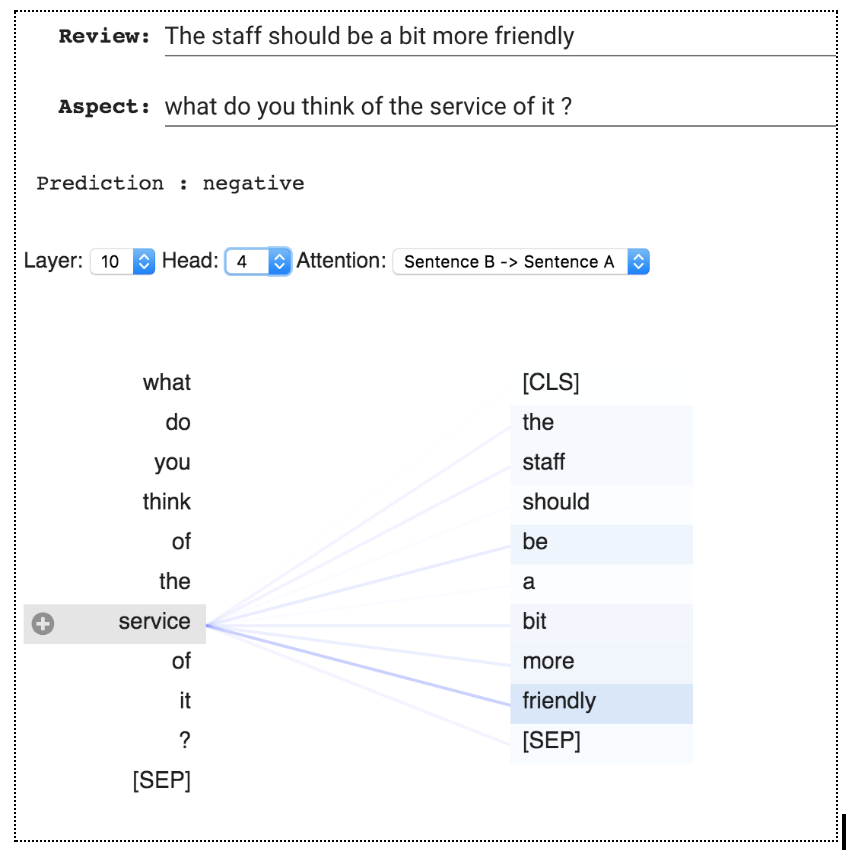
<p>I also observed that there are heads that focus on the complete phrase in a review that talks about the relevant aspect in the question.</p>

<p><img src="https://cdn-images-1.medium.com/max/3232/1*NZ4HK28r09zc8r6bYbCt2w.png" alt="" /></p>

<p><img src="https://cdn-images-1.medium.com/max/2000/1*z5k_sU1cRThdr_Vhqk5Uiw.png" alt="" /></p>

<p><strong><em>4. Attending to the opposite aspect :</em></strong></p>

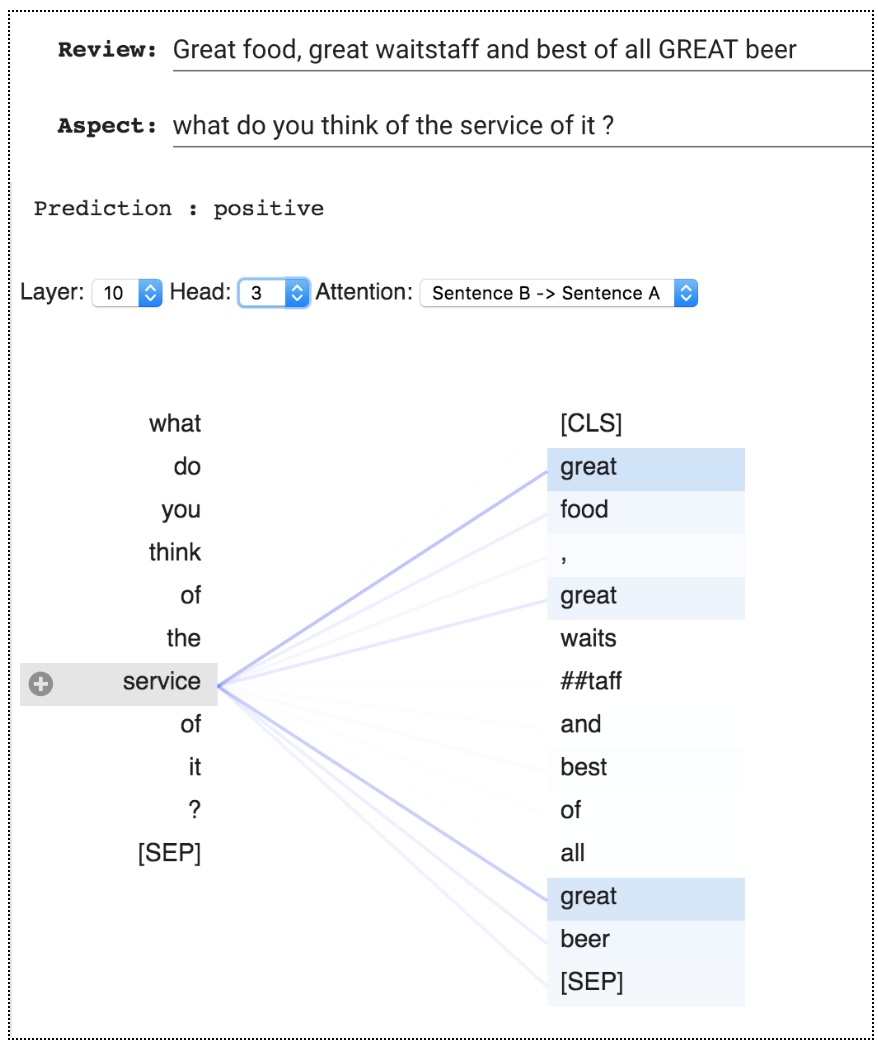
<p>Surprisingly, the head 10–3 was focussing mostly on the other aspect and their related words that are not available in the question. Here we can see when the aspect in question is “service”, head focuses on “food” related words and vice-versa.</p>

<p><img src="https://cdn-images-1.medium.com/max/3284/1*5n32IasWYtZiYagDMGQ-bA.png" alt="" /></p>

<p><img src="https://cdn-images-1.medium.com/max/2000/1*QS8SMmYfT6pWmO4JghpxFg.png" alt="" /></p>

<p><strong><em>5. Absence of the interested aspect in the review — No-OP:</em></strong></p>

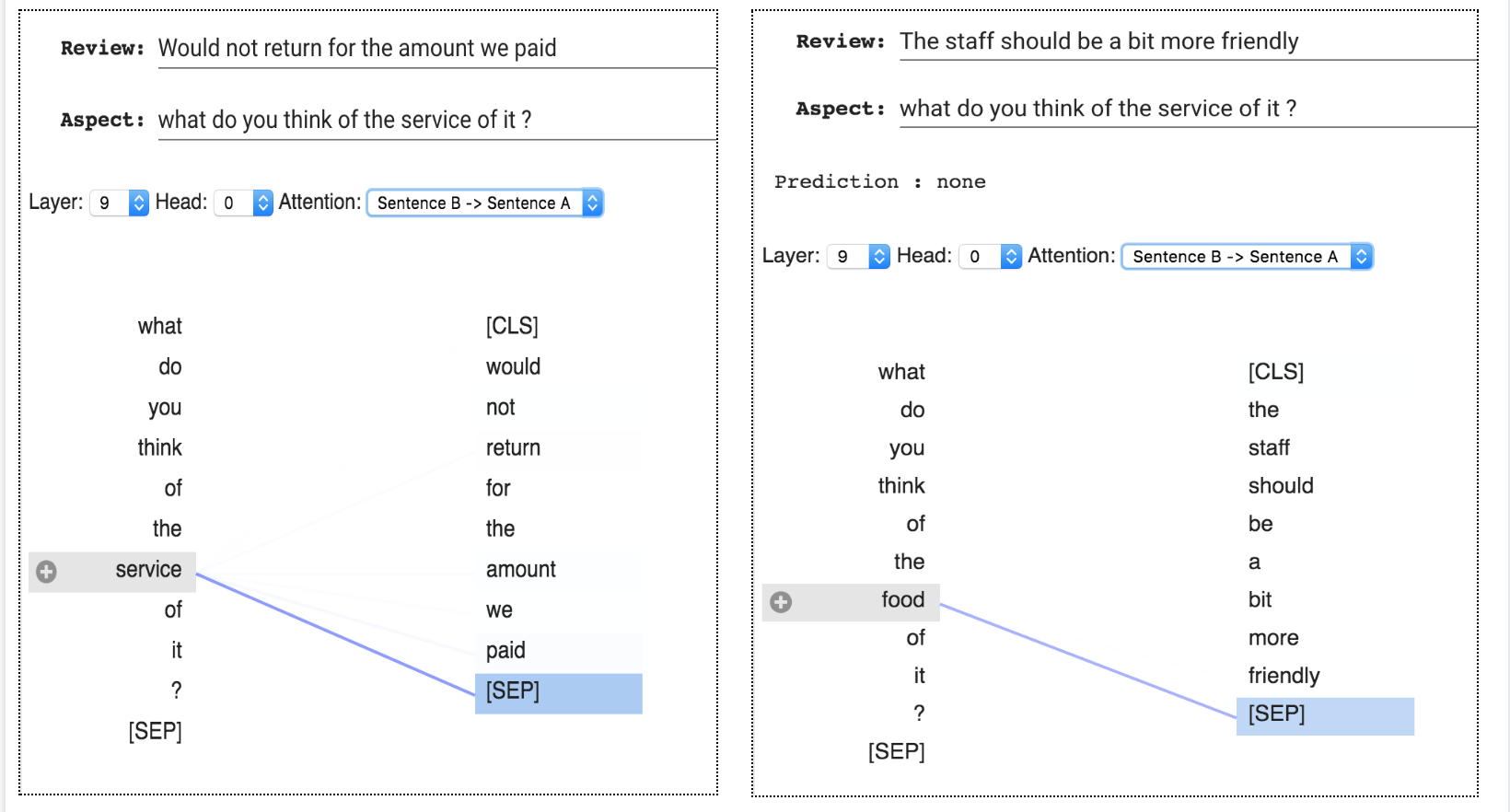
<p>When there is no mention of a given aspect in the review. Head focuses on [SEP] token. As a way of indicating the feature absence (No-Op), The heads that are designated to extract the absent feature focus on [SEP] token. This observation is in line with the findings of the paper — <a href="https://arxiv.org/pdf/1906.04341.pdf">what does BERT look at?</a> (Clark et al., 2019).</p>

<p><img src="https://cdn-images-1.medium.com/max/3280/1*dyNXwNXK5cN9iSuO71gH4g.png" alt="" /></p>

<h2 id="further-steps-">Further steps :</h2>

<ol>
  <li>Even though the heads that we have seen till now attend to the specified features in most cases, there are also examples where the heads don’t attend to those expected features. So, it would be really interesting to do a more formal study ( by measuring the accuracy of individual heads, similar to Clark et al., 2019 ) on each head and their ability to attend to the hypothetical feature.</li>
</ol>

<h2 id="code">Code:</h2>

<ol>
  <li>
    <p>Task-Specific learnings — <a href="https://colab.research.google.com/drive/1P4HWHso-bV5vW8pKDSqPERet507KGlr3">https://colab.research.google.com/drive/1P4HWHso-bV5vW8pKDSqPERet507KGlr3</a></p>
  </li>
  <li>
    <p>Linguistic and syntactic learning — Replicating the results of Clark et al.2019 — <a href="https://colab.research.google.com/drive/1z5W-JGtYBFfbIWZbIO73z0oIWtEFZJYO">https://colab.research.google.com/drive/1z5W-JGtYBFfbIWZbIO73z0oIWtEFZJYO</a></p>
  </li>
  <li>
    <p>Slides of my talk at DHS 2019 — <a href="https://github.com/infinitylogesh/Interpretable-NLP-Talk">https://github.com/infinitylogesh/Interpretable-NLP-Talk</a></p>
  </li>
</ol>

<h2 id="references-"><strong><em>References :</em></strong></h2>

<ol>
  <li>
    <p>Kevin Clark, Urvashi Khandelwal, Omer Levy and Christopher D. Manning, <a href="https://arxiv.org/abs/1906.04341">What Does BERT Look At? An Analysis of BERT’s Attention</a> (2019).</p>
  </li>
  <li>
    <p><a href="http://jalammar.github.io/illustrated-transformer/">The illustrated transformer</a></p>
  </li>
  <li>
    <p>Huggingface’s <a href="https://github.com/huggingface/transformers">transformer</a> library</p>
  </li>
  <li>
    <p><a href="https://github.com/jessevig/bertviz">BertViz</a>.</p>
  </li>
</ol>]]></content><author><name></name></author><category term="blog" /><summary type="html"><![CDATA[An attempt to understand features and patterns learnt by a Fine-tuned BERT model]]></summary></entry><entry><title type="html">A Visual intuition of Bayes Rule</title><link href="https://infinitylogesh.github.io/blog/2019/07/25/visual-bayes-intuition.html" rel="alternate" type="text/html" title="A Visual intuition of Bayes Rule" /><published>2019-07-25T00:00:00+00:00</published><updated>2019-07-25T00:00:00+00:00</updated><id>https://infinitylogesh.github.io/blog/2019/07/25/visual-bayes-intuition</id><content type="html" xml:base="https://infinitylogesh.github.io/blog/2019/07/25/visual-bayes-intuition.html"><![CDATA[<p>A <a href="https://www.quora.com/What-is-an-intuitive-explanation-of-Bayes-Rule">question</a> from Quora made me think about the intuition of Bayes theorem, so I tried to work out a visual intuition from one of the scenarios mentioned in the <a href="https://qr.ae/TWnBwr">answers</a>.</p>

<h3 id="problem">Problem:</h3>

<p>Let’s say, your friend is trying to convince you that being rich does not make someone happy by quoting a reputed study, which says only 10% of happy people are rich. You being a logical person, you know that the actual statistic that would make sense here is the <strong>percentage of rich people that are happy</strong> and not the other way around. So you set out to find it out using Bayes rule.</p>

<h3 id="bayes-rule">Bayes rule:</h3>

<table>
  <tbody>
    <tr>
      <td>Bayes rule is often used to find the reverse probabilities of a known conditional probability. In our case, we would like to find P(Happy</td>
      <td>Rich) from the known value P(Rich</td>
      <td>Happy),</td>
    </tr>
  </tbody>
</table>

<div class="language-plaintext highlighter-rouge"><div class="highlight"><pre class="highlight"><code>P(Happy|Rich) = (P(Happy) X P(Rich|Happy))/ P(Rich)
</code></pre></div></div>

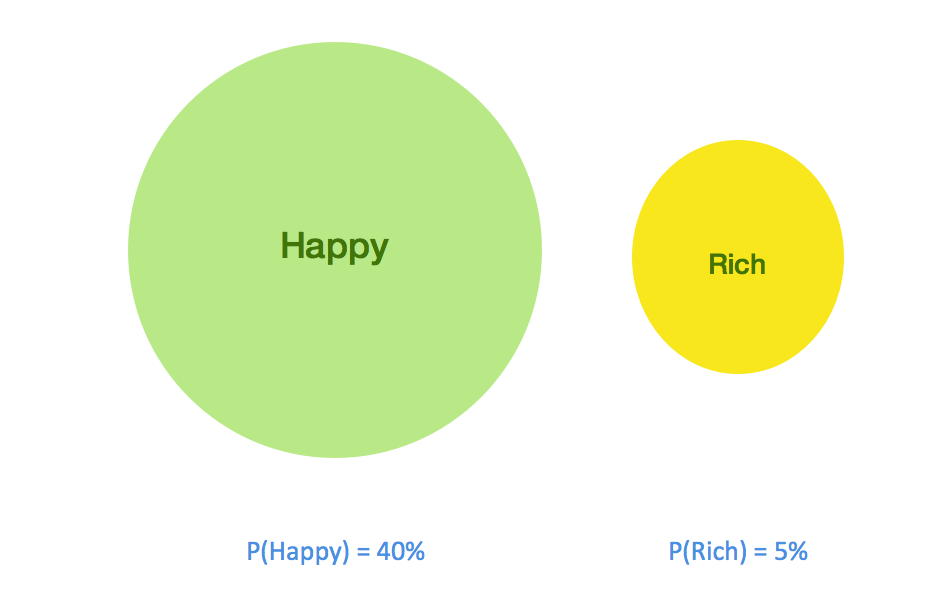
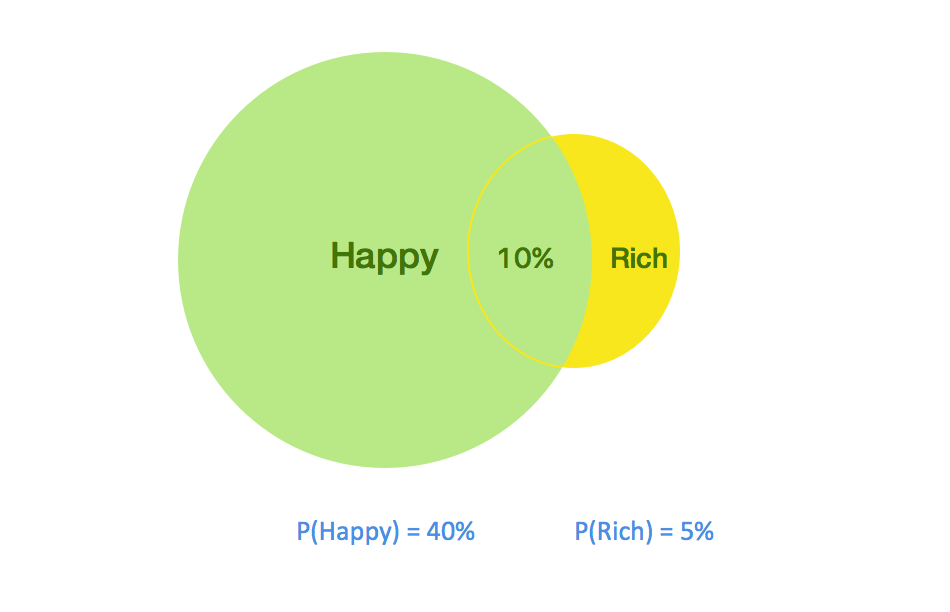
<p>Let us try to have a visual intuition of the above equation by considering that the probability of someone being happy is 40% and the probability of someone being rich is 5%</p>

<p><img src="https://cdn-images-1.medium.com/max/2000/1*cUSx5gQp4tMs05GVLfz3pQ.png" alt="" /></p>

<p>The green and yellow circles represent the probability distribution of people being happy and rich respectively. And we know from the study that 10% of Happy people are rich. That is the overlap area is 10% of the Happy circle. All this information can be visualized as below.</p>

<p><img src="https://cdn-images-1.medium.com/max/2000/1*5V0rWVEPKaGbTwbA1HAVsg.png" alt="" /></p>

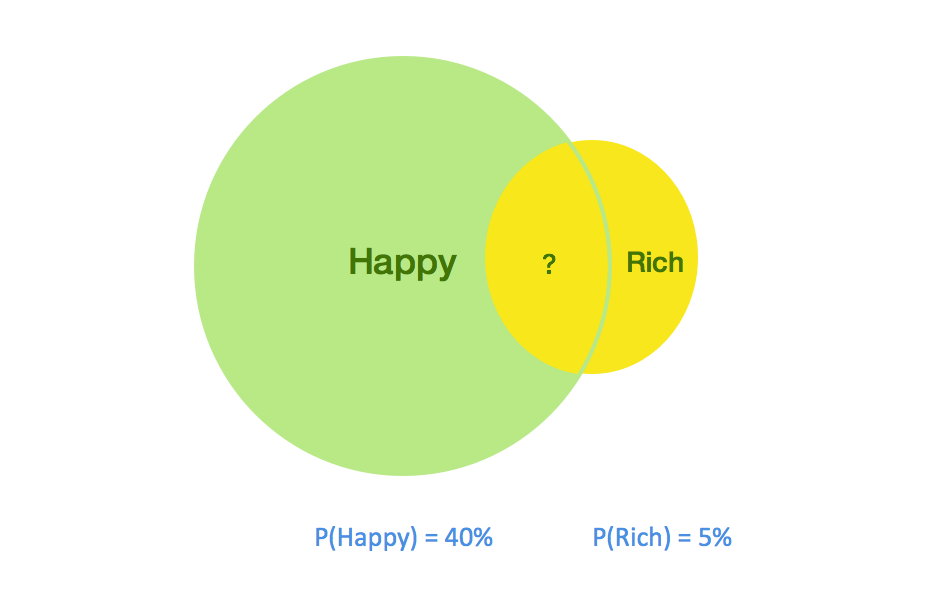
<p>The data that we are interested in is the percentage of rich persons that are happy. This can be rephrased as the percentage area occupied by the overlap on the Rich circle (as shown below).</p>

<p><img src="https://cdn-images-1.medium.com/max/2000/1*lNFwNN84rjkTrWs6YmFLZg.png" alt="" /></p>

<p>The overlap area can be calculated as :</p>

<div class="language-plaintext highlighter-rouge"><div class="highlight"><pre class="highlight"><code>  overlap area = P(Happy)  X  Percentage of overlap on P(Happy)
               = P(Happy)  X  P(Rich|Happy)

  overlap area = P(Happy)  X Percentage of overlap on P(Rich)
               = P(Rich)   X P(Happy|Rich) 

  combining the above two equations,

  P(Rich) X P(Happy|Rich) = P(Happy) X P(Rich|Happy)

  **P(Happy|Rich) = (P(Happy) X P(Rich|Happy)) / P(Rich)**
               =  40% X 10% / 5%
               =  0.4 X 0.1 / 0.05 = 0.8 = **80%**
</code></pre></div></div>

<p>So, 80% of Rich people are happy.</p>

<h3 id="caveats-">Caveats :</h3>

<ol>
  <li>
    <table>
      <tbody>
        <tr>
          <td>Why is the intersection of two probability distribution be considered as a conditional probability (P(Happy</td>
          <td>Rich)) rather than a joint probability (P(Happy, Rich))?</td>
        </tr>
      </tbody>
    </table>
  </li>
</ol>

<p>Yes, in a general setting intersection of two probability distribution is always a joint probability. But in our case, we are only interested in the condition of people being happy or rich and our distribution is not representative of other cases like not-rich or not-happy.</p>

<p>In other words, this is the probability that a person can be happy given that he is rich. So, the intersection should be considered as a conditional probability.</p>]]></content><author><name></name></author><category term="blog" /><summary type="html"><![CDATA[A question from Quora made me think about the intuition of Bayes theorem, so I tried to work out a visual intuition from one of the scenarios mentioned in the answers.]]></summary></entry><entry><title type="html">A Handy pre-trained model for language Identification</title><link href="https://infinitylogesh.github.io/blog/2019/03/17/language_detection.html" rel="alternate" type="text/html" title="A Handy pre-trained model for language Identification" /><published>2019-03-17T00:00:00+00:00</published><updated>2019-03-17T00:00:00+00:00</updated><id>https://infinitylogesh.github.io/blog/2019/03/17/language_detection</id><content type="html" xml:base="https://infinitylogesh.github.io/blog/2019/03/17/language_detection.html"><![CDATA[<p>I was trying to find solutions to gracefully handle Non-English based input to one of our deep learning-based NLP model which was trained only on English samples. Non-English words are out of vocabulary to the model, it wasn’t handling it well. Even though we wanted to make the model multi-lingual ( more on it in future posts) in the future, stumbling upon Fast text’s pre-trained language detection model was a pleasant surprise and made us consider it as an interim solution. So wanted to write a short post on it.</p>

<p>As a pre-requisite install the <a href="https://github.com/facebookresearch/fastText/tree/master/python">fastText</a> library.</p>

<div class="language-bash highlighter-rouge"><div class="highlight"><pre class="highlight"><code>
<span class="nv">$ </span>git clone https://github.com/facebookresearch/fastText.git
<span class="nv">$ </span><span class="nb">cd </span>fastText
<span class="nv">$ </span>pip <span class="nb">install</span> <span class="nb">.</span>

</code></pre></div></div>

<p>Download the pre-trained model from <a href="https://fasttext.cc/docs/en/language-identification.html">here</a>. The compressed version of the model is just a little shy of 1MB and supports 176 languages. Which is an amazing work by Fast text team.</p>

<p>Load the model in memory using the fastText library. <em>Make sure the inputs are encoded in UTF-8</em>. <em>Model supports only UTF-8 as it was trained only on UTF-8 samples.</em></p>

<div class="language-python highlighter-rouge"><div class="highlight"><pre class="highlight"><code>
<span class="kn">import</span> <span class="nn">fasttext</span>
<span class="kn">import</span> <span class="nn">sys</span>
<span class="nb">reload</span><span class="p">(</span><span class="n">sys</span><span class="p">)</span>
<span class="n">sys</span><span class="p">.</span><span class="n">setdefaultencoding</span><span class="p">(</span><span class="s">'UTF8'</span><span class="p">)</span> <span class="c1"># default encoding to utf-8
</span><span class="n">lid_model</span> <span class="o">=</span> <span class="n">fastText</span><span class="p">.</span><span class="n">load_model</span><span class="p">(</span><span class="s">"lid.176.ftz"</span><span class="p">)</span>

</code></pre></div></div>

<p>prediction using the loaded model.</p>

<div class="language-python highlighter-rouge"><div class="highlight"><pre class="highlight"><code>
<span class="n">lid_model</span><span class="p">.</span><span class="n">predict</span><span class="p">(</span><span class="s">"மதியும் மடந்தை முகனு மறியா பதியிற் கலங்கிய மீன்."</span><span class="p">)</span> 
<span class="c1">#output - ((u'__label__ta',), array([0.99988115]))
# __label__ta - tamil
</span>
<span class="n">lid_model</span><span class="p">.</span><span class="n">predict</span><span class="p">(</span><span class="s">"Incapaz de distinguir la luna y la cara de esta chica,Las estrellas se ponen nerviosas en el cielo."</span><span class="p">)</span>
<span class="c1">#output - ((u'__label__es',), array([0.93954092]))
# __label__es - spanish
</span>
<span class="n">lid_model</span><span class="p">.</span><span class="n">predict</span><span class="p">(</span><span class="s">"Unable to tell apart the moon and this girl’s face,Stars are flustered up in the sky."</span><span class="p">)</span>
<span class="c1">#output - ((u'__label__en',), array([0.93129086]))
#__label__en - english
</span>
</code></pre></div></div>

<p>The output is a tuple of language label and prediction confidence. Language label is a string with “<strong>lable</strong>” followed by ISO 639 code of the language. Full code is <a href="https://github.com/infinitylogesh/language-detection-fasttext">here</a>.</p>]]></content><author><name></name></author><category term="blog" /><summary type="html"><![CDATA[I was trying to find solutions to gracefully handle Non-English based input to one of our deep learning-based NLP model which was trained only on English samples. Non-English words are out of vocabulary to the model, it wasn’t handling it well. Even though we wanted to make the model multi-lingual ( more on it in future posts) in the future, stumbling upon Fast text’s pre-trained language detection model was a pleasant surprise and made us consider it as an interim solution. So wanted to write a short post on it.]]></summary></entry><entry><title type="html">Building an AWS lambda service to return binary data (image) as a response without Access header.</title><link href="https://infinitylogesh.github.io/blog/2018/10/09/aws_lambda_access_header.html" rel="alternate" type="text/html" title="Building an AWS lambda service to return binary data (image) as a response without Access header." /><published>2018-10-09T00:00:00+00:00</published><updated>2018-10-09T00:00:00+00:00</updated><id>https://infinitylogesh.github.io/blog/2018/10/09/aws_lambda_access_header</id><content type="html" xml:base="https://infinitylogesh.github.io/blog/2018/10/09/aws_lambda_access_header.html"><![CDATA[<p>The other day I was trying my hands at building a lambda service. As with other AWS offerings, it was not very user-friendly. Thanks to libraries like Claudia.js which made the process a little less painful. The major trouble I had was to return a binary ( image ) response from the service which can be directly used in a browser and render with the <img /> tag.</p>

<p>So after a day of fiddling with many AWS forum, Stackoverflow suggestions. I was lucky enough to find a working solution. I wanted to write this as a post. So that it will be a reference for my future self as well as it might help someone.</p>

<p><strong>The problem :</strong></p>

<p>By default AWS documentation and <a href="https://claudiajs.com/tutorials/binary-content.html">this </a>claudia.js tutorial required me to send* “Access: image/png” *header in my GET request for it to be recognized as a binary data.</p>

<div class="language-plaintext highlighter-rouge"><div class="highlight"><pre class="highlight"><code>curl --request GET -H "Accept: image/png" https://XXXXXX.execute-api.us-XXXX-1.amazonaws.com/endpoint
</code></pre></div></div>

<p>But this wouldn’t suit my use case of accessing it from the browser. Even though the browser by default sends multiple headers and “image” being one of the header, this was not considered by AWS API Gateway.</p>

<p><img src="https://cdn-images-1.medium.com/max/2700/1*ehSFT-c8Bkjj073jqac83A.png" alt="Browser’s request header" /><em>Browser’s request header</em></p>

<p><strong>Solution:</strong></p>

<ol>
  <li>Ensure that you include the success parameter and isBase64Encoded as shown below in your API router.</li>
</ol>

<div class="language-js highlighter-rouge"><div class="highlight"><pre class="highlight"><code>
<span class="nx">api</span><span class="p">.</span><span class="kd">get</span><span class="p">(</span><span class="dl">'</span><span class="s1">/route</span><span class="dl">'</span><span class="p">,</span> <span class="kd">function</span> <span class="p">(</span><span class="nx">request</span><span class="p">)</span> <span class="p">{</span>

  <span class="cm">/* .... Body of the router */</span>

  <span class="k">return</span> <span class="nx">data</span><span class="p">.</span><span class="nx">toString</span><span class="p">(</span><span class="dl">"</span><span class="s2">base64</span><span class="dl">"</span><span class="p">)</span> <span class="c1">// 1. route body should return response in Base64 String format.</span>
     
<span class="p">},{</span> <span class="c1">// &lt;-- 2. params required for binary response.</span>
    <span class="na">success</span><span class="p">:</span> 
            <span class="p">{</span> 
                <span class="na">contentType</span><span class="p">:</span> <span class="dl">'</span><span class="s1">image/png</span><span class="dl">'</span><span class="p">,</span> 
                <span class="na">contentHandling</span><span class="p">:</span> <span class="dl">'</span><span class="s1">CONVERT_TO_BINARY</span><span class="dl">'</span>
            <span class="p">},</span>
<span class="dl">"</span><span class="s2">isBase64Encoded</span><span class="dl">"</span><span class="p">:</span> <span class="kc">true</span>
<span class="p">});</span>

</code></pre></div></div>

<ol>
  <li>Add Mime type <em>“ */</em> ”* in the settings page of your API gateway console. This I guess enables API Gateway to consider browser’s multiple headers.</li>
</ol>

<p><img src="https://cdn-images-1.medium.com/max/2000/1*8yeuSQq3ZyvB1anYeEB5eg.png" alt="Configuration in API Gateway" /><em>Configuration in API Gateway</em></p>

<ol>
  <li>Deploy the API.</li>
</ol>

<p><strong>One little quirk:</strong> Whenever you deploy an update via Claudia.js, the allowed mime types in API gateway seem to reset itself. So you may have to repeat from step 2, for each update.</p>

<p>I have included an example lambda service to resize an image on the fly, which demonstrates all these in detail. The complete code can be found <a href="https://gist.github.com/infinitylogesh/4e0f774f5f48252a767a65f75e527ccd">here</a></p>]]></content><author><name></name></author><category term="blog" /><summary type="html"><![CDATA[The other day I was trying my hands at building a lambda service. As with other AWS offerings, it was not very user-friendly. Thanks to libraries like Claudia.js which made the process a little less painful. The major trouble I had was to return a binary ( image ) response from the service which can be directly used in a browser and render with the tag.]]></summary></entry></feed>